

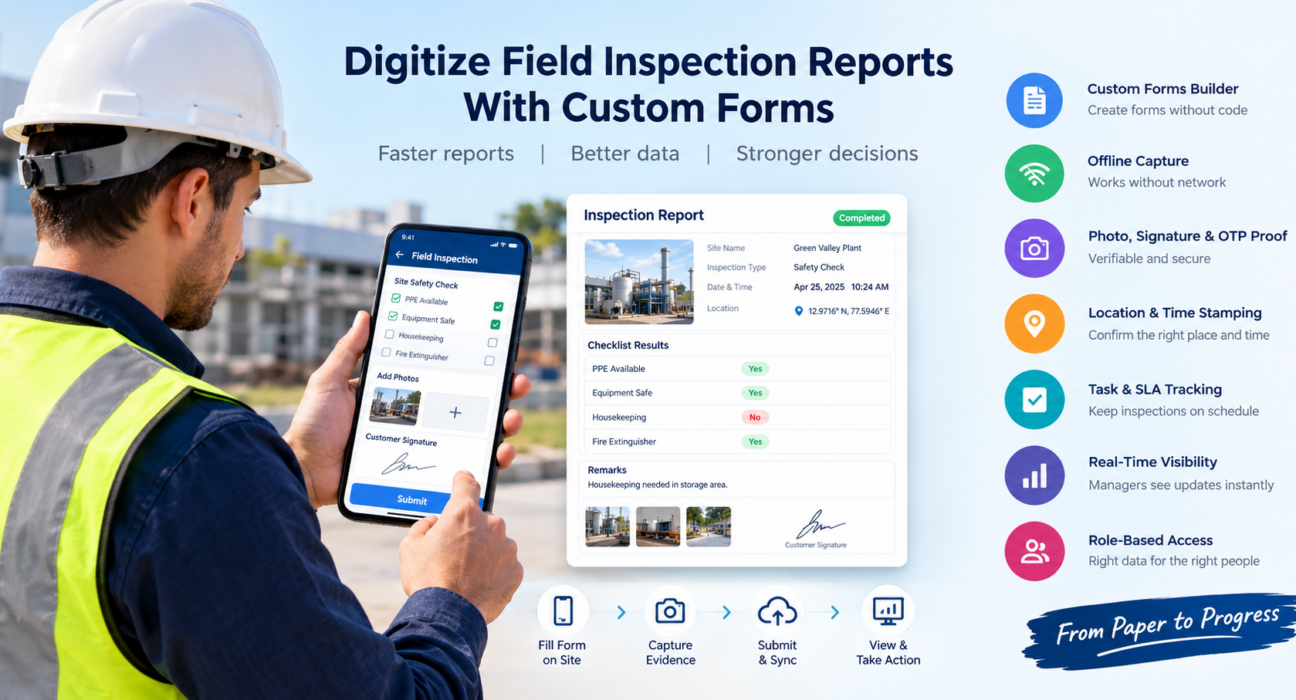
How to Digitize Field Inspection Reports With Custom Forms
Paper inspection reports slow every field team down. Someone fills in a checklist on site, photographs it or carries it back to the office, and someone else retypes it into a spreadsheet. By the time a manager sees the result, the issue may already be days old.
Digital field inspection forms fix this. Inspectors fill in a structured form on their phone, attach photos and signatures, and submit it. Managers see the report almost immediately, in a consistent format.
This guide explains what digital inspection forms are, how to build them step by step, which features matter, and how a field force management platform such as FieldExecutives fits in.
What Are Digital Field Inspection Forms?
Digital field inspection forms are structured, mobile-friendly forms that field employees use to record inspection data on site. They replace paper checklists, and the data is stored centrally instead of in a notebook or a chat thread.
A typical form can include:
- Text, number, date and dropdown fields
- Checklists and yes/no questions
- Photo capture
- Customer or supervisor signatures
- Remarks and severity ratings
- Location and time details for the visit
Because every inspector answers the same questions in the same format, the data is much easier to review, compare and report on.
Why Paper and Spreadsheet Inspection Reports Fall Short
Most teams don’t switch to digital because paper is inconvenient. They switch because paper causes real operational problems.
- Delayed reporting. Managers can’t act until the paperwork arrives.
- Inconsistent data. Each inspector writes things differently, or skips fields.
- Double entry. Retyping reports into spreadsheets wastes time and introduces errors.
- Weak proof. It is hard to show that an inspection happened at the right place and time.
- Poor traceability. Finding one past report means digging through files or old messages.
- No trend visibility. Recurring issues are hard to spot when data lives on paper.
For teams working under service-level agreements, audits or client reviews, these gaps carry real risk.
Paper vs. Digital Inspection Reports
| Factor | Paper or spreadsheet | Digital inspection forms |
|---|---|---|
| Data entry | Manual, often repeated | Captured once, on the phone |
| Consistency | Varies by inspector | Standard fields and required answers |
| Evidence | Loose photos, if any | Photos and signatures attached to the report |
| Speed to manager | Hours or days | Shortly after submission |
| Searching past reports | Slow | Searchable records |
| Reporting | Built by hand | Data ready for analysis |
How to Digitize Field Inspection Reports: 6 Steps
To digitize field inspection reports, list your current checklists, design a custom form for each inspection type, set required fields and proof, test it with a small team, connect it to your workflow, and review the data. Here is each step in more detail.
Step 1: Audit Your Existing Inspection Process
Collect every paper form, checklist and spreadsheet your team uses. Note which questions are essential, which are repeated, and which nobody reads.
Ask inspectors and managers what slows them down. Their answers show you what the new form must fix.
Step 2: Define What Each Inspection Must Capture
Separate the information you need for each inspection type. A site safety check and a maintenance visit do not need the same fields.
Decide what counts as proof. That might be photos, a customer signature, an OTP, a location stamp, or all of them.
Step 3: Build Custom Forms Around Your Workflow
Design one form per inspection type instead of forcing everything into a single template. Group related questions into sections and keep the wording short and unambiguous.
Use the right field type for each question:
| Data you need | Best field type |
|---|---|
| Pass/fail or compliance status | Yes/No or dropdown |
| Condition rating | Dropdown or rating scale |
| Measurements or readings | Number field |
| Visual evidence | Photo upload |
| Sign-off | Signature field |
| Extra context | Remarks text box |
Dropdowns and checklists reduce typing and keep answers consistent, which makes reporting far easier later.
Step 4: Make the Right Fields Mandatory
A form that can be submitted half-empty defeats the purpose. Mark critical fields as required, such as photos for failed items or signatures for closure.
Don’t make every field mandatory, though. Too many required fields push inspectors to rush or enter placeholder answers.
Step 5: Test With a Pilot Team
Run the form with a small group of inspectors for a week or two. Watch for questions that confuse people, sections that take too long, and fields that are always left blank.
Adjust the form based on real field feedback before rolling it out to everyone.
Step 6: Connect Forms to Review and Reporting
A digital form is only useful if the data leads to action. Decide who reviews submissions, how issues are escalated, and which reports managers need to see.
Then track patterns over time, such as recurring defects, delayed inspections or sites with repeated issues.
Features to Look for in Digital Inspection Form Software
Not every form tool suits field work. When comparing options, check for:
- A no-code form builder. Operations teams should be able to change forms without developer help.
- Offline capture. Many inspection sites have weak or no network. Forms should work offline and sync later.
- Photo, signature and OTP proof. These make each report verifiable.
- Location and time stamping. This confirms the inspection took place where it should.
- Checklists and guided workflows. These keep inspectors on a consistent process.
- Task and SLA tracking. Inspections should tie into assignments and deadlines.
- Real-time visibility for managers. Supervisors should see submissions and team activity as they happen.
- Role-based access. Different users should see and edit only what they need.
Best Practices for Designing Inspection Forms
- Keep forms short. Only ask what someone will actually use.
- Use plain language. Avoid ambiguous questions like “Is condition acceptable?” and define what acceptable means.
- Prefer structured answers. Dropdowns and checklists beat free text for reporting.
- Require evidence for exceptions. Ask for a photo and remark whenever an item fails.
- Version your forms. When requirements change, update the form deliberately and tell your team.
- Train inspectors briefly. A short walkthrough prevents most early mistakes.
- Review the data regularly. If nobody uses a field, remove it.
Where Digital Inspection Forms Are Used
Custom inspection forms suit any team that verifies work or conditions on site, including:
- Facility management and housekeeping rounds
- Field service and repair visits
- Construction site supervision
- Retail and merchandising audits
- Telecom and utility site visits
- Bank and NBFC field verification
- Government and public inspections
Because each of these teams records different data, the ability to customize fields matters more than any fixed template.
How Field Force Management Software Helps
Standalone form apps capture data, but they usually stop there. Field inspections also involve assignment, attendance, location, proof and follow-up.
Businesses looking to simplify these processes can use field force management software such as FieldExecutives. It brings the surrounding workflow into one platform:
- Custom forms builder. Admins can create forms by drag and drop, without writing code, and match them to their own job types and checklists.
- Guided job execution. Field employees follow a job card and complete checklists, then capture photos, signatures or OTPs as proof.
- Offline-first mobile app. Reps can complete visits without a network, and data syncs once they reconnect.
- Geofenced check-ins and live tracking. Managers can confirm that a visit happened at the right place and time.
- SLA timers and task assignment. Inspections can be assigned to the right person with a deadline attached.
- Real-time visibility. Managers see field activity from a single console instead of chasing updates.
Using inspection forms inside a field force platform means the report is linked to the visit, the person who did it and the time it happened. That context is what turns a form into a reliable record.
Common Mistakes to Avoid
- Copying a paper form into digital form without simplifying it
- Making forms too long for use on a phone
- Skipping the pilot phase
- Not defining who reviews submissions
- Ignoring offline scenarios
- Collecting data that no one ever analyzes
Conclusion
Digitizing inspection reports is less about replacing paper and more about getting reliable, structured evidence back to decision-makers quickly. Well-designed digital field inspection forms give you consistent data, verifiable proof and faster follow-up, without extra paperwork for your team.
Start by auditing your current forms, build one custom form for one inspection type, and pilot it with a small team. Then expand as you see what works.
If you want inspection forms, task assignment, proof capture and live field visibility in one place, FieldExecutives can help you set up the workflow your team actually uses.