
Best Employee GPS Tracking Apps for Field Teams in India
If you manage a field sales, service, or delivery team in India, you already know the problem: you can’t see where your people are, what they’re doing, or whether that “client visit” actually happened. An employee GPS tracking app solves this by giving you real-time visibility into field activity — without micromanaging your team through phone calls.
This guide breaks down what an employee GPS tracking app actually does, the features that matter most for Indian field operations, how to choose the right one, and how to roll it out the right way — legally and without resistance from your team.
What Is an Employee GPS Tracking App?
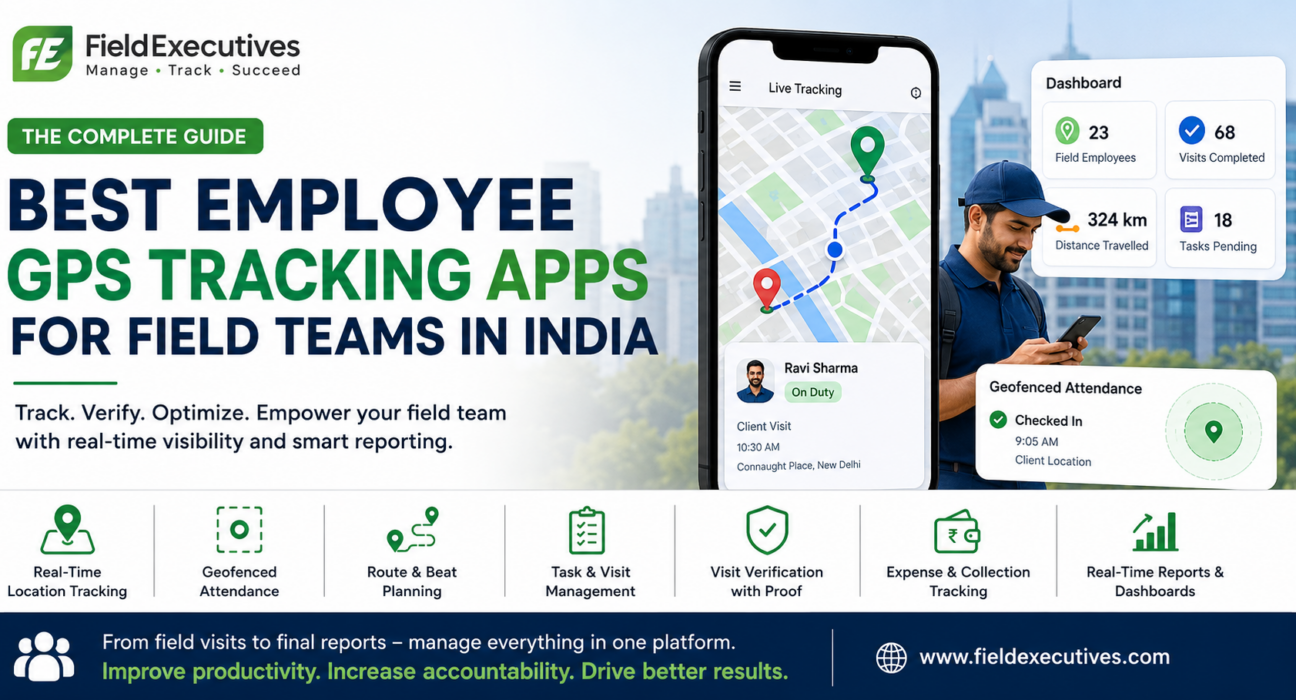
An employee GPS tracking app is a mobile and web-based system that uses a smartphone’s GPS to record and share a field employee’s location during working hours. Managers view this data on a live dashboard, along with attendance, visit history, and route travelled.
Unlike consumer location-sharing apps, a proper field employee GPS tracking app is built for business use. It typically combines location tracking with attendance, task management, and reporting — because location data alone rarely tells the whole story of field productivity.
Why Indian Businesses Need GPS Tracking for Field Teams
Field operations in India come with challenges that office-based teams don’t face:
- Large, spread-out territories — sales reps and service engineers often cover multiple cities, towns, or rural belts.
- Manual reporting — many businesses still rely on WhatsApp updates, phone calls, or end-of-day Excel sheets to know what happened in the field.
- Verification gaps — without location proof, it’s hard to confirm whether a customer visit, delivery, or site inspection actually took place.
- Fragmented tools — attendance, expenses, and task tracking are often managed separately, creating duplicate work.
A dedicated GPS tracking app for field staff addresses these issues by centralizing location, attendance, and activity data in one place, replacing guesswork with verified, real-time information.
Core Features to Look For in an Employee GPS Tracking App
Not every tracking app is built the same way. When evaluating options, look beyond the map view and check whether the platform covers the following:
1. Real-Time Location Tracking
The app should show live location of every field employee on a map, with configurable tracking intervals that balance visibility with battery usage.
2. Geofencing
Geofencing lets you draw virtual boundaries around client sites, offices, or territories. The app automatically detects when an employee enters or exits a zone — useful for verifying visits and restricting attendance check-ins to approved locations.
3. GPS-Based Attendance
Field staff should be able to mark check-in and check-out directly from their location, removing the need for physical registers or biometric devices at a central office.
4. Route and Beat Planning
For sales teams following fixed customer routes (“beats”), the app should support route planning and beat planning, helping reps cover their assigned territory efficiently and reducing unproductive travel.
5. Task and Visit Management
Beyond location, the app should let managers assign daily tasks or visits, and let employees update status, capture visit notes, or attach photos as proof.
6. Customer Visit Verification
Location-tagged check-ins at customer sites confirm that a visit genuinely happened, which is especially important for sales, collections, and service teams.
7. Expense and Collection Tracking
Field roles often involve travel expenses and cash or digital collections. Look for apps that let employees log these directly from the field, linked to their visit and location data.
8. Real-Time Reporting and Dashboards
Managers need summarized reports — attendance, visits completed, distance travelled, tasks pending — without manually compiling data from multiple sources.
9. Custom Forms and Workflows
Every industry captures different field data. A flexible app should let you build custom forms for site inspections, surveys, or order forms instead of forcing a rigid template.
Comparison: What Separates a Basic Tracker From a Complete Field Force Platform
| Capability | Basic GPS Tracking App | Complete Field Force Management Platform |
|---|---|---|
| Live location tracking | Yes | Yes |
| Geofenced attendance | Sometimes | Yes |
| Route/beat planning | Rarely | Yes |
| Task assignment & tracking | No | Yes |
| Visit verification with proof | No | Yes |
| Expense & collection logging | No | Yes |
| Custom forms & workflows | No | Yes |
| Real-time reports & dashboards | Basic | Detailed, role-based |
A standalone GPS tracker shows you where your team is. A complete field force management platform shows you where they are, what they’re doing, and how productive they’ve been — which is what most businesses actually need to make decisions.
How to Choose the Right Employee GPS Tracking App
When shortlisting a solution, evaluate it against your actual field operations, not just the feature list:
- Map features to your workflow. A pharma company tracking medical representatives has different needs than a logistics business tracking delivery agents.
- Check ease of use for field staff. If the mobile app is complicated, adoption will suffer regardless of how powerful the dashboard is.
- Look for offline support. Field teams often work in low-connectivity areas; the app should sync data once connectivity resumes.
- Confirm data security and compliance. Location data is sensitive personal data — ask how it’s stored, who can access it, and how consent is managed.
- Evaluate reporting depth. You should be able to generate attendance, visit, and productivity reports without manual compilation.
- Consider scalability. Choose a platform that works whether you have 20 field employees today or 200 next year.
Businesses looking to simplify these processes can use field force management software such as FieldExecutives, which brings GPS tracking, attendance, task management, and reporting together on a single platform instead of relying on separate tools.
Legal and Consent Considerations for GPS Tracking in India
Tracking employee location is not just a technology decision — it’s also a compliance one. Under India’s Digital Personal Data Protection (DPDP) Act, 2023, location data qualifies as personal data, and businesses are expected to collect it with clear notice and appropriate consent from employees.
Practical steps for compliant rollout:
- Inform employees clearly about what is tracked, when, and why.
- Limit tracking to working hours wherever possible.
- Use the data strictly for legitimate business purposes such as attendance, safety, and operational reporting.
- Choose a platform that stores and transmits location data securely.
Being transparent about tracking — rather than treating it as surveillance — also improves adoption, since employees are more likely to cooperate when they understand the purpose (faster reimbursements, accurate attendance, safety in remote locations).
Best Practices for Rolling Out a GPS Tracking App
- Communicate the “why” before the “what.” Explain how tracking benefits employees too — quicker attendance approval, protection in case of disputes, safer fieldwork.
- Start with a pilot team. Roll out to one team or region first, gather feedback, then expand.
- Set clear tracking hours. Define when tracking is active to build trust and reduce concerns about after-hours monitoring.
- Train managers on using reports, not just watching maps. The real value comes from acting on visit, attendance, and productivity data — not from staring at a live map all day.
- Review and refine routes and beats regularly. Use travel data to identify inefficient routes and adjust territory plans.
Teams evaluating this shift can explore [Internal Link Opportunity: Relevant FieldExecutives feature page on GPS tracking] to understand how location data connects with attendance and reporting in practice.
Industries That Benefit Most From Employee GPS Tracking Apps
- FMCG and distribution — tracking sales reps across retail and distributor visits.
- Pharmaceuticals — monitoring medical representative visits and doctor coverage.
- Field service and maintenance — verifying technician arrival at service sites and job completion.
- Logistics and delivery — tracking delivery agents and optimizing last-mile routes.
- Real estate and field sales — confirming site visits and lead follow-ups.
Regardless of industry, the underlying need is the same: verified visibility into field activity, backed by accurate data instead of manual updates.
Conclusion
Managing a field team without visibility into where people are and what they’re doing leads to the same problems again and again — unverifiable visits, inefficient routes, delayed reporting, and reimbursements based on guesswork rather than data. An employee GPS tracking app solves this by replacing manual, phone-call-based updates with real-time location, attendance, and activity data.
As this guide has covered, the strongest solutions go beyond a simple map view. Look for geofenced attendance, route and beat planning, visit verification, expense tracking, and real-time reporting — all backed by clear consent practices under India’s DPDP Act, 2023. The right employee GPS tracking app isn’t the one with the most features on paper; it’s the one your field team will actually use every day, and that gives managers reliable data to act on.
If you’re ready to move away from manual tracking and give your field team the visibility they need, FieldExecutives brings GPS tracking, geofenced attendance, route planning, task management, and real-time reporting together on a single platform built for field teams across India.