
Best Calling CRM Software for Sales Teams: A Practical Buying Guide
Most sales teams don’t struggle with effort. Agents show up, dial numbers, talk to prospects, but leads still slip through the cracks, agents forget follow-ups, and nobody’s quite sure which calls actually turned into sales. A calling CRM fixes exactly this: it puts dialing, lead tracking and follow-ups in one place instead of scattering them across spreadsheets, sticky notes and someone’s memory. Before comparing vendors, it’s worth understanding what a calling CRM actually does and where it differs from a general CRM.
This guide walks through what a calling CRM is, which features actually matter for outbound sales, how to shortlist vendors, and where teams commonly go wrong when choosing one.
What Is a Calling CRM?
A calling CRM centers on the calling workflow itself: dialing, logging and following up, rather than just storing customer records. It usually bundles a dialer, a lead database, automatic call logging and follow-up scheduling into a single screen, so agents aren’t switching between four tools to make one call.
Why Sales Teams Need a Dedicated Calling CRM
General CRMs don’t account for high-volume calling. Most focus on account management or long B2B deal cycles, where a rep might touch a deal a handful of times over several months. Telecalling doesn’t work that way.
An agent making 60 to 100 calls a day needs the phone to dial itself, the outcome to log in one tap, and the next follow-up to appear automatically. A CRM that assumes someone will remember to type notes after every call simply can’t keep up with that pace.
That gap shows up clearly when you line the two up side by side:
| Requirement | General CRM | Calling CRM |
|---|---|---|
| Dialing leads | Manual or click-to-call add-on | Built-in auto dialer |
| Call logging | Manual entry after each call | Automatic, one-tap outcome |
| Follow-up reminders | Basic task reminders | Priority-based, outcome-triggered |
| Call recording and analysis | Rare, or via third-party tools | Native, often with AI summaries |
| Lead source integration | Generic forms and APIs | Ready-made ad and portal integrations |
In short, if your team’s job is mostly picking up the phone, a calling CRM removes a few of the tools agents currently juggle.
Key Features to Look for in a Calling CRM
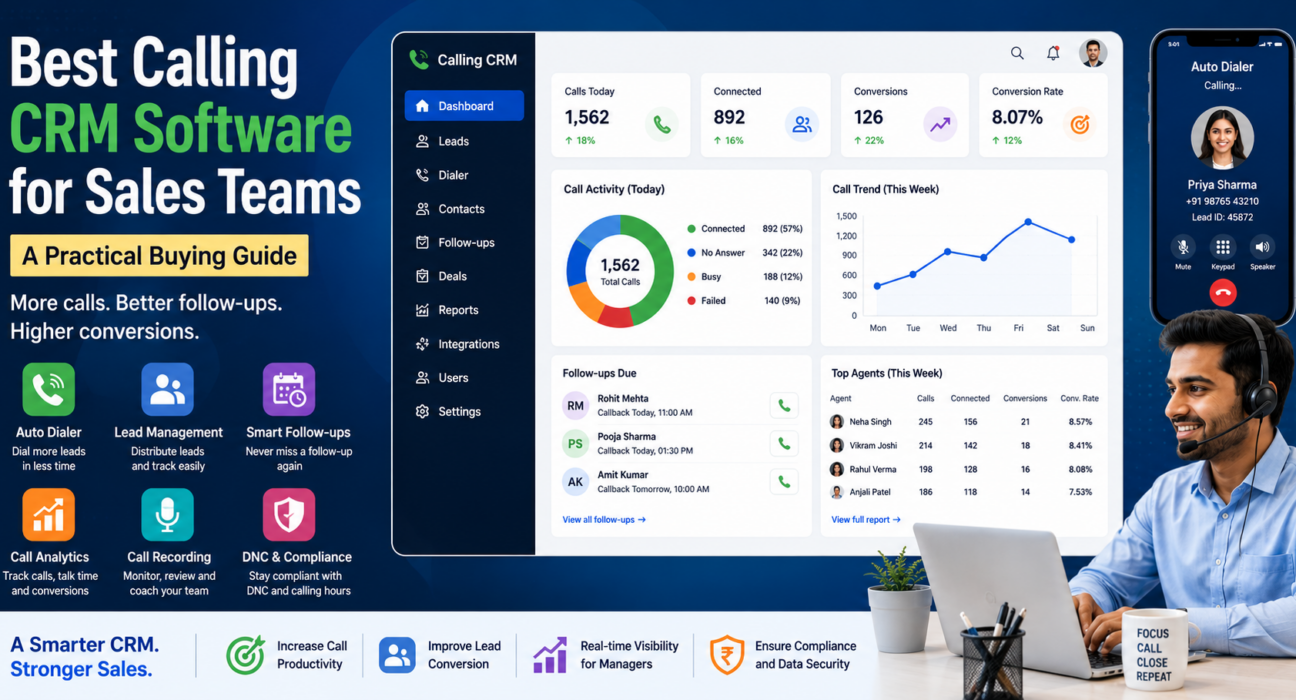
Calling CRMs vary a lot in depth. Some cover the basics; others go much further with AI and automation. Here’s what to actually check before you shortlist anyone.
Dialing and call management
This is the core of the product, so test it first, not last. Look for an auto dialer with click-to-call or SIM-based calling, recordings you can replay without digging through folders, queues that respect call priority, and a way to restrict calling hours so agents aren’t dialing outside permitted windows.
Lead management and follow-up
- Bulk import that catches duplicate leads before they cause double-calling
- Assignment rules that route leads to the right agent, not just the next free one
- Scoring or tagging so agents know which leads to call first
- Automatic follow-up scheduling based on what happened on the call
Follow-up is really where a calling CRM earns its price. Leads don’t usually go cold because the pitch was weak; they go cold because nobody called back on day three. TeleCallingCRM’s guide on choosing a telecalling CRM covers this piece in more depth if you want to dig further.
AI call intelligence
A growing number of calling CRMs now transcribe calls automatically, generate a short summary, tag sentiment, and score call quality, which can save a sales manager from listening to hours of recordings every week. It’s worth checking one specific thing: does the transcription actually handle Hindi or Hinglish well, or only English?
Compliance and data security
- DNC list enforcement, so agents aren’t calling numbers that have opted out
- Encrypted recordings, not just audio files sitting in a folder
- Retention settings you can configure yourself, not a fixed default
Reporting and team visibility
Managers shouldn’t have to interrupt agents all day to know what’s happening. Real-time dashboards, leaderboards and exportable reports in CSV, Excel or PDF mean you can check performance without calling a status-update meeting.
Integrations and messaging
- Lead capture from Facebook, Instagram, Google Ads or property portals, so leads land in the system without manual entry
- WhatsApp, SMS and email from the same screen agents already use to call
- A Zapier-style connector for whatever else the business runs on
How to Choose the Best Calling CRM for Your Sales Team
Work through these steps instead of deciding on price or a single demo call.
- Work out your real call volume and team size first. A 5-person team and a 50-seat floor need very different levels of automation.
- Check exactly where your leads come from, and confirm the CRM connects to those sources directly rather than needing manual export-import.
- Ask how follow-up reminders actually get triggered — by time, by call outcome, or both.
- Get on a real call with the dialer before deciding anything. Demos look clean; actual call quality on your own network is what agents will live with daily.
- For regulated industries such as insurance or finance, look closely at DNC handling and recording consent. This part isn’t optional.
- Weigh per-user pricing against flat-fee pricing over a full year, not just the number on the pricing page today.
- Run the trial with your own leads, not the vendor’s sample data. Agents judge a tool differently once real stakes are on the line.
Real-World Examples by Industry
These are hypothetical examples meant to show typical use, not documented case studies.
- Real estate: An agency pulling leads from property portals uses auto-assignment so agents call fresh enquiries within minutes, while buyer interest is still high.
- Insurance: A renewals team sets follow-up reminders around policy expiry dates so nobody misses a renewal call in the shuffle.
- Education: An admissions team tags leads by course interest and leans on call scripts to keep counselling consistent across different callers.
- Recruitment: A staffing firm tracks call outcomes by source to see which channel actually produces qualified candidates, not just volume.
Since the details change a lot by sector, it’s worth looking at industry-specific calling CRM setups before settling on a configuration.
Common Mistakes When Choosing a Calling CRM
- Picking the cheapest option without checking whether the dialer or follow-up automation can actually handle your call volume
- Skipping data migration planning, which is how teams lose months of lead history mid-switch
- Treating compliance as an afterthought, especially in regulated sectors
- Buying the tool but skipping agent training, so adoption stalls in the first week
- Forgetting that mobile access matters for anyone doing field sales or working remotely
Limitations of Calling CRM Software
A calling CRM won’t do everything. It centers on outbound calling and lead follow-up, not deep marketing automation, e-commerce checkout, or full support ticketing across chat and social. A large enterprise juggling calling alongside chat support, email tickets and social all at once will likely outgrow a calling-focused tool and need something broader.
And no CRM fixes a weak pitch. If deals are falling through because of pricing, product fit, or a script that doesn’t work, better software won’t change that. Only a better sales process will.
How TeleCallingCRM Fits This
TeleCallingCRM targets outbound sales and telecalling teams specifically: an auto dialer, lead assignment rules, AI transcription and sentiment scoring, DNC and compliance controls, and WhatsApp, SMS and email messaging, all under one flat monthly price instead of a per-user fee. It isn’t the right fit for everyone. A business that needs heavy marketing automation or a full multi-channel support desk will likely need something broader. But for a team whose main job is calling and following up on leads, it covers most of what’s described above.
Frequently Asked Questions
What is a calling CRM and how is it different from a regular CRM?
A calling CRM centers on the calling workflow itself: dialing, logging, following up. A regular CRM mostly keeps records for accounts and deals. The practical difference shows up in daily use — a calling CRM includes auto dialers, one-tap call outcomes and automated follow-up reminders as standard, while a general one often lacks them or adds them on as an afterthought.
Is a calling CRM only useful for call centres?
Not really. Any team that spends a good part of the day calling leads, including real estate, insurance, education, recruitment or B2B sales, gets value from one. Formal call centres just tend to need it more visibly.
How does a calling CRM improve lead follow-up?
It takes the reminder out of someone’s head and puts it into the system. The CRM creates follow-ups automatically based on how a call ended, so agents don’t rely on memory or a task list they forget to check. Most leads don’t go cold because of a bad pitch; they go cold because nobody called back in time.
What features matter most for a telecaller CRM?
Auto dialing, lead assignment, follow-up automation, call recording and basic reporting cover the essentials. AI summaries and compliance tooling matter more once the team, or the regulatory requirements, grow bigger.
Can a small sales team get by with a spreadsheet instead?
For a very small team, briefly, maybe. But a spreadsheet can’t dial, can’t remind anyone to call back, and can’t track what actually happened on a call, so the moment volume picks up, the cracks show fast.
Is call recording through a calling CRM compliant with regulations?
It depends on the vendor and where you operate. Check for encrypted recordings, DNC list support, and retention settings you control, and separately confirm the consent rules that apply in your industry. Software alone doesn’t guarantee compliance.
How much does calling CRM software typically cost?
It varies by vendor. Some charge per user, which adds up quickly as a team grows; others charge a flat monthly fee regardless of headcount. It’s worth modelling both against where your team will be in a year, not just where it is today.
Can a calling CRM work for field sales or remote agents?
Yes, provided the mobile app genuinely handles the job: dialing, offline access to lead details, and the ability to log outcomes and follow-ups from a phone, not just a cut-down version of the desktop screen.
Conclusion
In the end, choosing a calling CRM isn’t about finding the tool with the longest feature list. It’s about matching dialing, lead management, follow-up automation and compliance to how your team actually calls, day to day. The features agents will actually use matter more than the ones that look good on a comparison sheet. If you’re at the shortlisting stage, it’s worth checking calling CRM pricing and plans to see what fits your team’s size and budget.