
Live Field Team Tracking: How Managers Can Monitor Operations in Real Time
Your team leaves the office at 9 a.m. By noon, you can’t say who has reached a customer, who is stuck in traffic, or who hasn’t started. Usually, you find out at the end of the day, and by then it’s too late to fix anything.
Live field team tracking closes that gap. Instead of waiting for reports, managers can see where each field employee is and what they’re doing while the work is still happening. This guide explains what it is, what it should track, and how to set it up. It also covers how to use it without damaging trust with your team.
What Is Live Field Team Tracking?
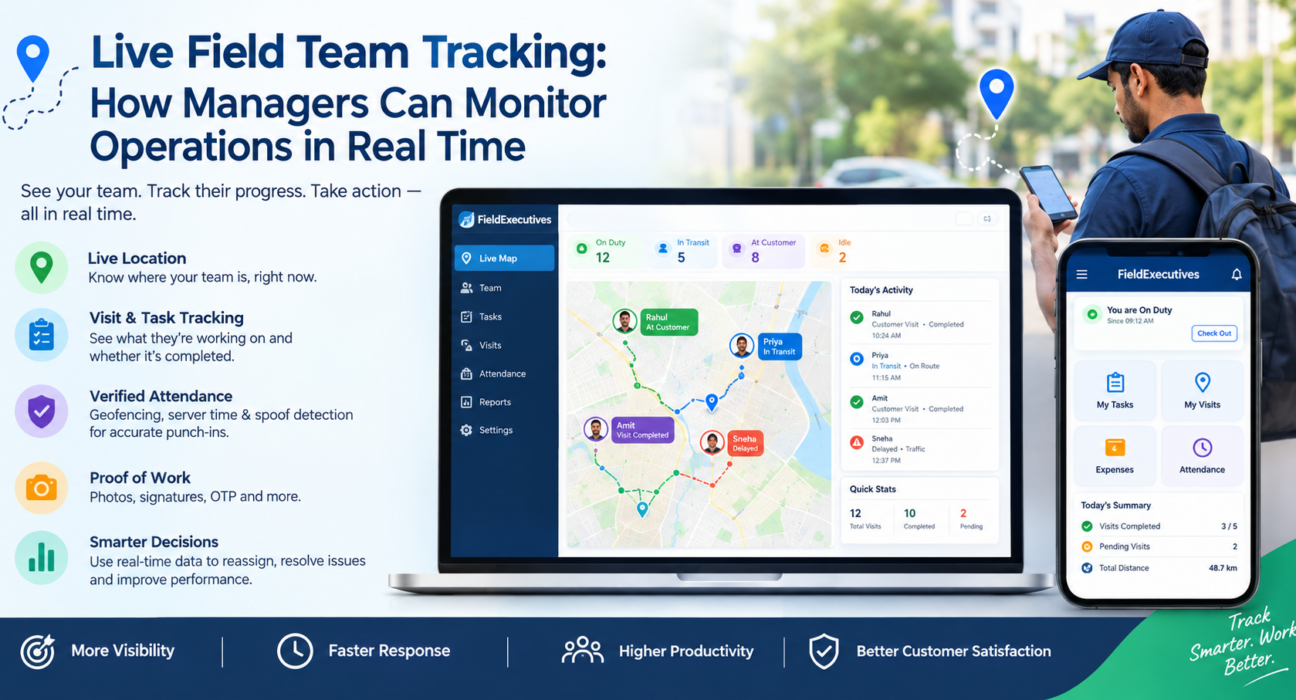
Live field team tracking is the real-time monitoring of field employees’ location, attendance, visits and task status, usually through a mobile app and a manager dashboard. Reps use the app during duty hours, and managers see the results on a live map instead of waiting for end-of-day reports.
However, it goes beyond a dot on a map. Good tracking connects location to work: which visit a rep is on, whether it was completed, and what proof was captured. That link is what separates operational tracking from plain GPS.
Why Managers Lose Visibility Once Teams Step Out
Most field problems come from the same few gaps:
- No live location. For example, you can’t tell who is near an urgent customer request.
- Unverified visits. Without proof, “I visited” is just a claim.
- Scattered reporting. Attendance goes on paper, updates go on WhatsApp and expenses sit in spreadsheets, so nobody has a complete picture.
- Late discovery. Missed visits and delays surface days later, after the customer has already noticed.
Real-time monitoring turns these from after-the-fact reviews into same-day corrections. As a result, managers can act while there’s still time.
What Should Live Field Tracking Actually Show?
A useful tracking system covers the whole day, not just movement.
1. Attendance and punch-in status
Managers should see who has started work, who is late and who hasn’t punched in. To prevent manipulation, look for server-time punch-ins so a rep can’t edit the phone’s clock. Geofencing and mock-location detection also help confirm that the punch-in happens at the right place.
2. Live location and movement
A live map with each rep’s status (at a customer, in transit, idle) is the core view. In addition, a GPS breadcrumb trail shows where a rep went during the day. This helps when you’re resolving disputes or reviewing routes.
3. Visit and task progress
Location alone doesn’t tell you whether the work got done. Therefore, track each visit’s status, checklist completion and outcome. That way, you can see progress against the day’s plan.
4. Proof of presence and proof of work
Proof of presence shows the rep was at the location, while proof of work shows what they did. Photos, signatures, OTP confirmation and custom form fields captured before a job closes give you both.
5. SLA timers
For service and delivery teams, live tracking should also show which jobs are approaching a deadline. Consequently, you can reassign work before a breach happens.
Live Tracking vs. Basic GPS Tracking
Many buyers ask whether a GPS app is enough. GPS tracking only tells you where someone is. Live field team tracking tells you where they are, what they’re working on and whether the work was completed.
| Capability | Basic GPS tracker | Live field team tracking |
|---|---|---|
| Shows current location | Yes | Yes |
| Verified attendance (geofence, server time) | Rarely | Yes |
| Visit and task status | No | Yes |
| Proof of visit (photo, signature, OTP) | No | Yes |
| SLA monitoring | No | Yes |
| Works with expenses and collections | No | Often |
| Manager KPIs and reports | Limited | Yes |
If all you need is to find a vehicle, GPS may be enough. However, if you need to manage people and outcomes, you need operational tracking.
How to Monitor Field Operations in Real Time: Step by Step
- Define what you need to see. First, decide whether attendance, visit completion, delivery status or SLA compliance matters most. This choice shapes your setup.
- Set up your team structure. Next, organise users by role, territory and reporting line so each manager sees the right people.
- Plan the day’s work. Then assign tasks and visits with checklists, priorities and deadlines. Tracking is only meaningful when there’s a plan to compare against.
- Turn on verified attendance. Use geofenced, server-time punch-ins so the day starts with reliable data.
- Require proof on key jobs. Make photo, signature or OTP capture mandatory before a job can be closed.
- Watch the live view during the day. Check exceptions such as late starts, idle reps and jobs near their SLA limit, rather than watching every dot.
- Review the trail and KPIs at day’s end. Finally, use the data for coaching, route improvements and planning.
How Managers Use Live Tracking Day to Day
Reassign work quickly. When an urgent request comes in, the live map shows who is closest and free. This is especially useful for field service, repair and delivery operations.
Catch problems early. A rep who hasn’t started by mid-morning, or a job about to breach its SLA, is visible while there’s still time to act.
Verify visits without calling around. Proof captured in the app replaces the follow-up calls and the “trust me” conversations.
Improve routes. By comparing planned and actual movement, you can see where time is lost. Route and beat-plan optimisation can then reduce unnecessary travel.
Coach with data. Instead of giving general feedback, managers can point to specific visits, timings and outcomes.
Best Practices: Tracking Without Micromanaging
Live tracking works best when the team sees it as a support tool rather than surveillance.
- Track duty hours only. Location visibility should apply to on-duty staff who have granted permission, not to personal time.
- Be transparent. Before rollout, tell your team what is tracked, when and why.
- Explain the benefit. Verified attendance protects honest employees, and proof of visit backs up their work.
- Manage by exception. Focus on outliers and blocked jobs instead of watching everyone constantly.
- Check local requirements. Employee monitoring and data-protection rules vary, so confirm what applies to your business and put your policy in writing.
- Keep access controlled. Use role-based access so that only the right managers see location and activity data.
Common Challenges and How to Handle Them
Poor network coverage. Field work often happens in areas with weak connectivity. For this reason, choose an app that works offline and syncs when the connection returns.
Team resistance. Involve reps early, explain the purpose, and start with a pilot group.
Too much data. More dashboards don’t mean better decisions. Instead, pick a handful of metrics, such as on-time punch-in, visits completed and SLA compliance, and review them consistently.
Fake or spoofed data. Server-side timestamps, geofencing and mock-location detection reduce manipulation.
What to Look for in Live Field Tracking Software
Use this checklist when comparing tools:
- Live map with rep status and a GPS trail
- Server-time, geofenced attendance with spoof detection
- Task and visit assignment with checklists
- Proof capture (photo, signature, OTP, custom forms)
- SLA timers and alerts
- Offline-first mobile app for Android and iOS
- Manager console with KPIs, reports and role-based access
- Support for expenses, collections and approvals, if your team handles them
- Configurable workflows that fit your process
How FieldExecutives Supports Live Field Team Tracking
Businesses looking to simplify these processes can use field force management software such as FieldExecutives. Because it combines tracking with the rest of the field workflow, managers don’t have to stitch together separate tools.
According to the FieldExecutives website, the platform includes:
- A live team map showing reps, routes, visits and outcomes in real time
- Geofenced attendance with server-time punch-ins and mock-location detection
- A GPS breadcrumb trail of where each rep went
- Proof of visit through photo, signature and OTP capture
- Task and visit management with checklists and SLA timers
- AI-based route and beat-plan optimisation to reduce travel time
- An offline-first mobile app for Android and iOS
- Expense and collection workflows, plus custom forms and KPIs
The platform is used across industries such as logistics, field service and repair, FMCG distribution, pharma, and banking and collections. However, any time or cost savings should be treated as indicative, since results depend on your team, territory and processes.
Conclusion
Live field team tracking gives managers what they lose the moment the team leaves the office: a clear, current view of the day. The most useful systems combine verified attendance, live location, visit progress and proof of work, so you’re managing outcomes rather than just locations.
To get started, decide what you most need to see, roll it out transparently, and manage by exception. Then, if you’re ready to see how it would work for your team, explore FieldExecutives and watch your field operations on one live map.