
High Volume Calling Software: What to Look For in a CRM for Sales Calls
When a team makes hundreds of calls a day, small delays add up. Ten seconds to dial, thirty seconds to type a note, a few minutes hunting for the next lead. Multiply that by 15 agents and a full shift, and hours of selling time disappear.
The right high volume calling software removes most of these gaps by dialing leads in order, logging outcomes quickly and keeping follow-ups organised. This guide explains how it works, which features matter, how the rules in India affect your choice and how to test a tool before you commit.
What Is High Volume Calling Software?
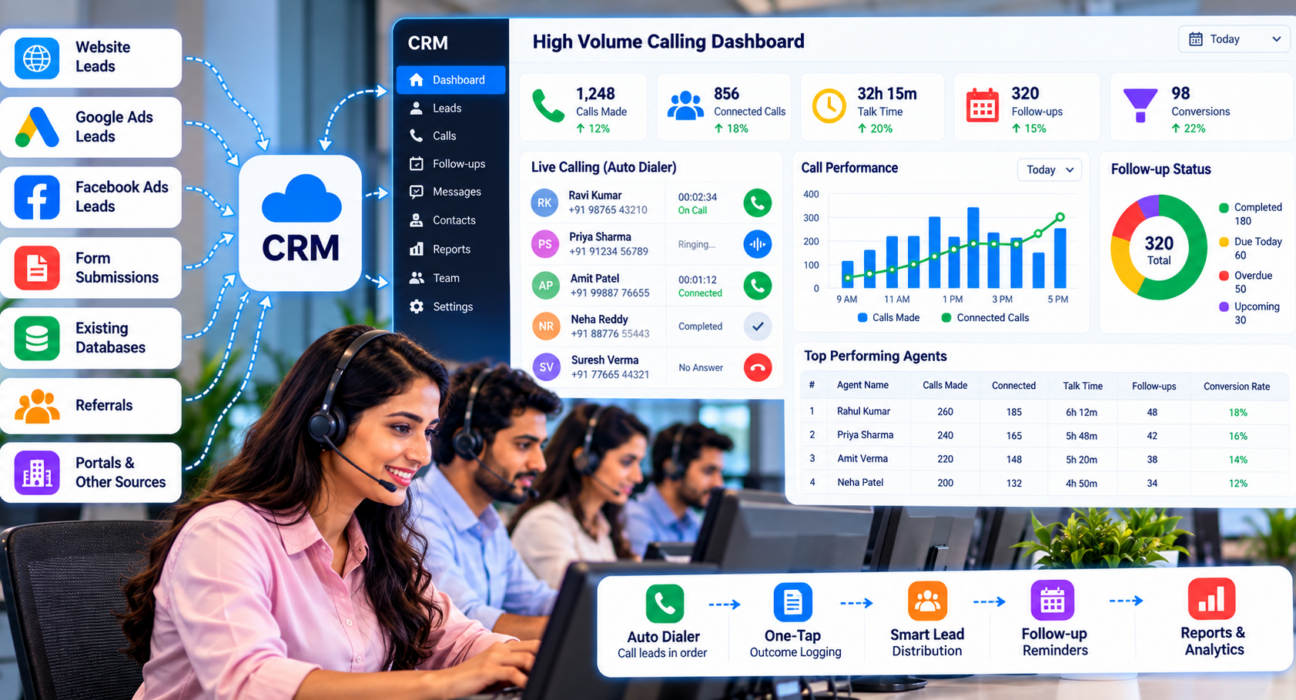
High volume calling software helps sales teams make many outbound calls efficiently. It combines a dialer that moves through lead lists, a CRM that stores call history and follow-ups, and reports that show how the team is performing. Its aim is to reduce time between calls so agents spend more of the day in conversations.
Where High-Volume Calling Breaks Down
Teams that scale calling without the right tools usually face the same problems:
- Agents dial manually and lose time between calls
- Leads are called in random order, so hot leads wait
- Outcomes are logged late, or not at all
- Callbacks are forgotten when the list grows
- Duplicate or Do Not Call (DNC) numbers are dialed
- Managers cannot see who is working until the day ends
Types of Dialers Explained
“Auto dialer” can mean different things. Knowing the types helps you choose.
| Dialer type | How it works | Best for | Watch out for |
|---|---|---|---|
| Manual | Agent dials each number | Very low volume | Slow, error-prone |
| Preview | Agent sees lead details, then triggers the call | Complex or high-value sales | Slower than automatic modes |
| Progressive | Dials the next lead when the agent is free | Most sales teams | Needs clean lists |
| Predictive | Dials several numbers per agent, based on expected answer rates | Very large teams with big lists | Complex, and can cause abandoned calls |
Most sales teams that need speed with personal conversations do well with a preview or progressive approach. Predictive dialing suits very large operations and carries more compliance and quality risk.
10 Features That Matter at High Volume
1. An auto dialer with priority order
The dialer should move through assigned leads in a sensible order, such as hot leads first, and let agents pause and resume when needed.
2. One-tap outcome logging
After each call, agents should record the result in a few seconds. Automatic capture of call duration saves further effort.
3. Clean data on entry
Look for de-duplication on import and DNC screening, so agents never waste calls on repeats or restricted numbers.
4. Smart lead distribution
Rules should assign leads by round-robin, language or fixed owner, so every agent always has a queue.
5. A reliable follow-up engine
At volume, callbacks multiply. You need reminders, overdue alerts and clear Today, Overdue and Upcoming lists.
6. Call recording and scripts
Recordings help with training and disputes. On-screen scripts keep new agents consistent.
7. A mobile app
Many teams work from phones or from home. Check that the app supports dialing, logging and follow-ups.
8. Real-time monitoring
Managers should see who is on a call, idle or away, without asking. This is also how you spot problems during the day, not after.
9. Useful reports
Look for connect rate, talk time, follow-ups completed, conversion by source and agent comparison.
10. Stable performance and clear pricing
Ask how the product behaves with large lists and many users. Check whether pricing is per user or flat, and whether features are locked behind higher plans.
SIM-Based vs Cloud-Based Calling
Another choice is how calls are placed. A SIM-based dialer uses the agent’s phone and SIM card, so calls show a normal mobile number and costs depend on your mobile plan. A cloud-based dialer routes calls over the internet through a telephony provider, which can add features such as virtual numbers and IVR, but brings its own setup, costs and rules.
Neither is better for everyone. Ask each vendor how calls are placed, what number the customer sees, who bears the call charges and what the regulations mean for that setup.
Calling Rules in India: Check Before You Dial
High-volume calling brings regulatory risk. India’s telecom regulator, TRAI, has clarified that the 140 series is designated for promotional calls, and that entities making promotional calls through it must register with telecom service providers under the TCCCPR framework. Customers can block promotional calls through the Do Not Disturb (DND) registry. You can read the details in this report on TRAI’s clarification.
What this means for you:
- Work out whether your calls are promotional, service or transactional
- Scrub your lists against DND preferences
- Ask your telecom provider and a legal adviser which numbers you may use for your type of calls
- Keep consent records, and respect calling hours
Software can enforce DND checks and calling windows, but it cannot decide what is legal for your business.
Numbers to Watch at High Volume
Volume alone does not show performance. Track these together:
- Calls per agent per day, and connected calls
- Connect rate by time of day and lead source
- Average talk time and time between calls
- Follow-ups completed on time
- Conversion rate by agent and source
Example: A 15-Agent Team (Hypothetical)
This is a hypothetical example. A loan sales team of 15 agents works a list of 20,000 enquiries.
- Leads are imported, de-duplicated and screened against the DND list
- Rules distribute leads by language
- Each agent works a prioritised queue, with hot leads first
- After each call, the agent taps an outcome and, if needed, sets a callback
- At noon, the manager checks overdue follow-ups and idle time, and reassigns stuck leads
Nothing here is complicated. The gain comes from removing small delays, hundreds of times a day.
How to Evaluate a Tool in a Trial
- Use real data. Import a few thousand of your own leads.
- Test with your agents. Ask three or four agents to work a full shift.
- Time the workflow. Measure the seconds between calls and during logging.
- Check follow-ups. Confirm that reminders and overdue alerts work on the phones your team uses.
- Review the manager view. Make sure you can see live activity and reports without exports.
- Ask about limits. Check record limits, user caps and which features cost extra.
Common Mistakes When Choosing High Volume Calling Software
- Choosing the most aggressive dialer. Faster is not better if conversations suffer.
- Ignoring compliance. Fines and blocked numbers cost more than slow dialing.
- Skipping data cleaning. Duplicates and wrong numbers waste agents’ time.
- Judging only by call count. Track connected calls and conversions too.
- Not training agents. Even simple tools need clear rules for outcomes and stages.
- Overlooking the follow-up process. At volume, missed callbacks are a major source of lost sales.
How TeleCallingCRM Supports High-Volume Calling
TeleCallingCRM is built for outbound calling teams. According to its website, it includes:
- A SIM-based smart auto dialer that works through each agent’s assigned leads in priority order, with pause and resume
- Automatic call-duration capture and one-tap outcome logging
- DNC numbers skipped, a calling-hours window and de-duplication on import
- Lead assignment rules by round-robin, language match or fixed agent
- Follow-up reminders, overdue alerts and smart follow-ups based on call outcomes
- Encrypted call recording, call scripts and an Android and iOS app
- A live war room, connection and answer rate reports and agent leaderboards
Note that the site describes a SIM-based auto dialer working through assigned lead lists, not predictive dialing. If you specifically need that, confirm it before you commit. You can compare options on the comparison page, and teams running larger floors may find the call center CRM page and the post on the best telecalling CRM tool for call centers and BPOs useful. The site lists plans from ₹999 per month and a 3-day free trial.
Frequently Asked Questions
What is high volume calling software?
It is software that helps sales teams make many outbound calls efficiently. It usually combines an auto dialer, a CRM for lead and call history, follow-up reminders and reports on team activity.
What is the difference between a power dialer and a predictive dialer?
A power or progressive dialer calls one number for an agent at a time, as soon as the agent is free. A predictive dialer calls several numbers per agent, based on expected answer rates, which can raise volume but also abandoned calls.
How many calls can an agent make in a day with an auto dialer?
It depends on lead quality, call length and the dialer type. Use your own data to set a target, and track connected calls and conversions, not just dials.
Do I need a separate dialer and CRM?
Not necessarily. Using separate tools often means switching screens and copying notes. A telecalling CRM with a built-in dialer keeps calls, history and follow-ups together, which saves time at volume.
Is auto dialing legal in India?
It depends on the type of call, the numbers used and your compliance with TRAI rules. Promotional calls face stricter requirements, including DND checks. Ask a legal adviser and your telecom provider before you start.
Can a small team use high volume calling software?
Yes. A team of five can also lose time dialing manually and missing callbacks. Choose software with simple pricing and quick setup, and add features as the team grows.
Conclusion
High volume calling software works when it removes small delays, keeps leads clean and makes follow-ups reliable. Choose one that fits your type of calling, test it with real leads and check the compliance basics before you scale.
If your team spends its day on the phone, you can compare plans for sales calling software and try it on your own lead list first.