
How to Track Sales Agent Performance With CRM Software
Most sales managers know who their loudest agent is. Fewer know who is making the most useful calls, who follows up on time, and who loses leads quietly. Without data, performance reviews become opinions.
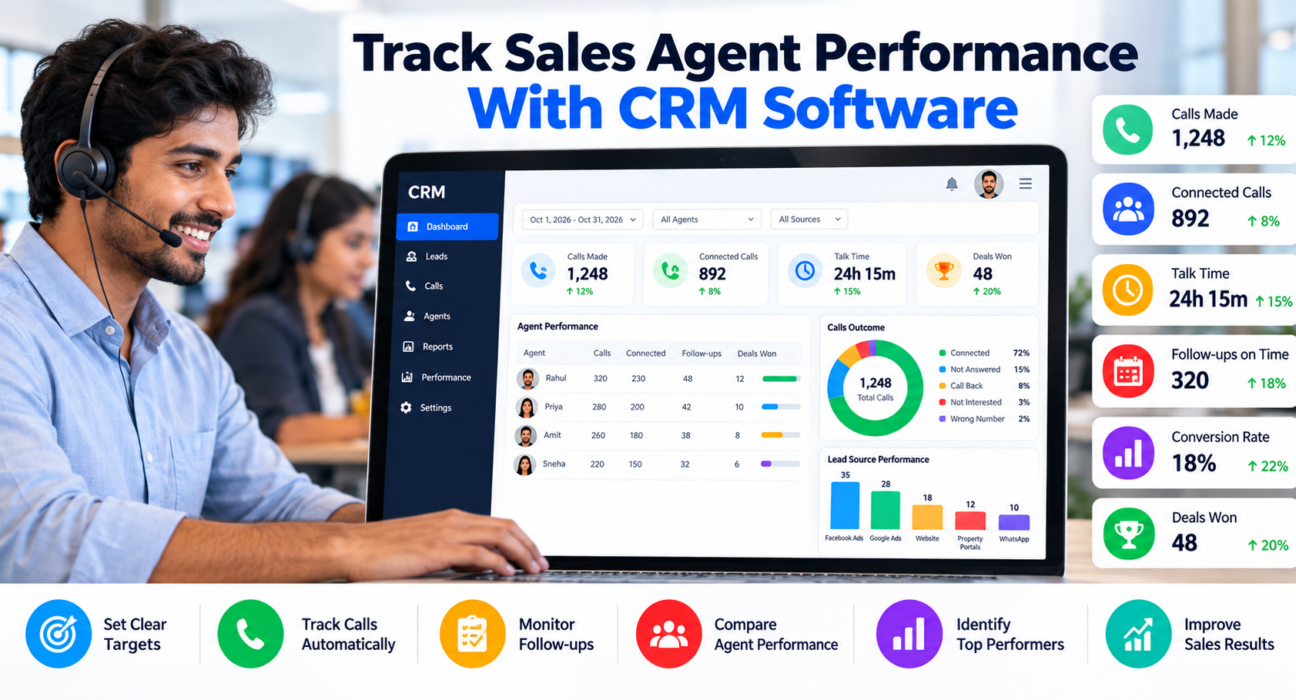
Good sales agent performance tracking replaces guesswork with a small set of numbers that every agent can see and understand. A CRM with call tracking and team analytics collects most of these numbers automatically, so managers do not need to chase agents for daily reports.
How Do You Track Sales Agent Performance With a CRM?
To track sales agent performance with a CRM, follow five steps:
- Choose a few metrics linked to your sales goal.
- Make agents log every call in the CRM.
- Set targets by agent or team.
- Review dashboards daily and weekly.
- Use the data for coaching, not only for pressure.
The CRM records activity (calls, talk time, follow-ups) and outcomes (deals won, revenue). You compare both against targets to see who needs help and what is working.
What Is Sales Agent Performance Tracking?
Sales agent performance tracking is the regular measurement of what each agent does and what results those actions produce. It covers activity, quality and outcomes.
- Activity: calls made, talk time, follow-ups completed.
- Quality: how well the calls are handled, such as discovery, tone and next steps.
- Outcomes: leads converted, deals won, revenue.
Tracking only one of these gives a misleading picture. An agent with high call volume but no conversions may need coaching. An agent with few calls but strong conversions may need more leads.
Why Tracking Agent Performance Matters
- Fair evaluation: Everyone is measured on the same facts.
- Faster coaching: Managers see problems early, such as low connection rates or late follow-ups.
- Better lead use: You can see whether leads are being called, and how quickly.
- Clear targets: Agents know what is expected each day and week.
- Less manual reporting: Managers spend less time collecting numbers from WhatsApp or Excel.
Key Metrics for Sales Agent Performance Tracking
Do not track everything. Start with the metrics below and add more only when you need them.
| Metric | What it tells you | Type |
|---|---|---|
| Calls made | Basic effort per day | Activity |
| Connected or answered calls | How many calls reach a person | Activity |
| Talk time | Time spent in real conversations | Activity |
| Idle time | Gaps between calls | Activity |
| Follow-ups done on time | Discipline in callbacks | Quality |
| Overdue follow-ups | Leads at risk of going cold | Quality |
| Call quality score | How well calls are handled | Quality |
| Lead-to-conversion rate | Share of leads that become customers | Outcome |
| Deals won and revenue | Business results | Outcome |
| Average deal size | Value per win | Outcome |
| Performance by lead source | Which sources each agent converts best | Outcome |
A useful rule: one or two activity metrics, one or two quality metrics and two outcome metrics are enough for most teams.
Activity metrics
Calls made and talk time show effort, but they do not show results. Treat them as health checks. If an agent’s talk time is very low, find out why. They may be getting few answered calls, or ending calls too quickly.
Quality metrics
Follow-up timeliness is one of the most practical quality metrics for telecalling teams. Many lost sales are simply leads that nobody called back. Overdue callbacks are an early warning sign.
Outcome metrics
Conversion rate and revenue show what really matters. Compare agents fairly. An agent who gets cold lists will convert less than one who gets warm inbound leads, so look at results by lead source too.
How to Set Up Sales Agent Performance Tracking: Step by Step
1. Define what “good” looks like
Write down your goal. Is it more appointments, more site visits, more admissions or more closed deals? Choose metrics that lead to that goal.
2. Make the CRM the single place for activity
Calls, notes, outcomes and next steps should be logged in the CRM, not in personal notebooks. If data lives elsewhere, your reports will be incomplete.
3. Standardise call outcomes
Use a short list of statuses, for example: Not Answered, Interested, Call Back, Not Interested, Wrong Number, Won. Fewer options mean cleaner data and less confusion for agents.
4. Set targets that match lead quality
Set realistic targets by team, role or lead type. A new agent and an experienced agent should not have identical targets in week one.
5. Review on a fixed schedule
- Daily: calls, connected calls, overdue follow-ups, who is idle.
- Weekly: conversion rate, revenue, source-wise results, trends.
- Monthly: targets, coaching needs, process changes.
6. Coach using call data
Pick two or three calls per agent and review them together. Focus on one improvement at a time, such as asking about budget earlier or confirming the next step before ending the call.
7. Share a leaderboard carefully
Leaderboards can motivate teams, but they can also discourage new agents. Rank on a balanced score, not only call volume.
Examples of Performance Tracking in Practice
These are hypothetical examples to show how the process works. They are not customer case studies.
Real estate: A team notices one agent has many calls but few site visits booked. The manager reviews calls and finds the agent rarely asks for a visit date. After coaching, the agent adds a clear next step to every interested lead.
Education: An admissions head sees that one counsellor has many overdue follow-ups. The issue is not effort but scheduling. Setting reminders at the end of each call helps.
Insurance: A manager compares agents by lead source. One agent converts renewal leads well but struggles with cold data lists. The manager reassigns leads to match strengths.
Common Mistakes in Sales Agent Performance Tracking
- Tracking too many metrics. Agents lose focus, and managers cannot act on the data.
- Rewarding only call volume. This encourages short, low-quality calls.
- Ignoring lead quality. Comparing agents without considering lead source is unfair.
- Using data only to punish. Agents start hiding or entering poor data.
- Not checking data accuracy. If agents skip logging, reports mislead.
- Waiting for month-end. Daily review catches problems while they can still be fixed.
- Forgetting privacy and consent. If you record calls or monitor agents, follow applicable laws and inform your team about what is tracked.
CRM Features That Help Track Agent Performance
When comparing CRM options, look for:
- Automatic call logging with duration and outcome
- Call recording and notes
- Follow-up reminders and overdue alerts
- Live view of agent activity
- Individual and team dashboards
- Source-wise and agent-wise conversion reports
- Custom reports and exports
- Role-based access, so managers see what agents should not
- A mobile app, if agents work from the field or remotely
How TeleCallingCRM Supports Performance Tracking
TeleCallingCRM is a telecalling CRM built for Indian outbound sales teams. Based on its website, relevant capabilities include:
- Call tracking: Every call is logged with duration, outcome, recording and notes.
- Live War Room: A real-time view of agents, leads and revenue, including talk time, utilisation and idle agents.
- Reports and analytics: Connection and answer rates, hourly heatmaps, a custom report builder, leaderboards, benchmarking and targets, and exports to CSV, Excel and PDF.
- Pipeline reporting: Won revenue, win rate and average deal size by agent and by source.
- AI call analysis: Calls are transcribed and summarised, with sentiment, a quality score from 0 to 10, action items and coaching notes.
- Follow-up management: Reminders, overdue alerts and recurring follow-ups.
- Roles and permissions: Role-based access control.
You can read more about the live monitoring view in this post on TeleCallingCRM’s Live War Room and reports. If you run a larger team, the call center CRM page explains how the setup applies there, and the pricing page lists plans by team size. For a broader buying checklist, see this guide to choosing call center CRM software.
A CRM will not fix weak coaching or unclear targets. It gives you the data. Your team still needs a process to act on it.
Quick Checklist Before You Start
- Have I chosen five to seven metrics tied to my sales goal?
- Do all agents log calls and outcomes in the CRM?
- Are call statuses standardised?
- Are targets realistic for each role and lead type?
- Do I review daily, weekly and monthly?
- Do I coach using actual call data?
- Have I told agents what is tracked and why?
Frequently Asked Questions
What is sales agent performance tracking?
It is the regular measurement of what sales agents do and achieve, covering activity (calls, talk time), quality (follow-ups, call handling) and outcomes (conversions, revenue). A CRM collects this data automatically so managers can review, coach and set fair targets.
Which metrics matter most for telecallers?
For telecallers, the most useful metrics are calls made, connected calls, talk time, follow-ups completed on time, conversion rate and revenue. Add quality scores if your CRM provides them. Avoid judging only on call volume.
How often should I review agent performance?
Review activity and overdue follow-ups daily, conversion and revenue weekly, and targets and coaching needs monthly. Frequent short reviews catch problems earlier than a single month-end report.
Can a CRM track agent performance automatically?
Yes, if agents make and log calls through the CRM. It can record call duration, outcomes, follow-ups and deals without manual entry. Accuracy still depends on agents using the system consistently.
How do I compare agents fairly?
Compare agents on the same lead type, source and time period. A cold list will convert lower than warm inbound leads. Use ratios such as conversion rate rather than raw counts, and consider experience level.
Will agents feel monitored too much?
They might, if tracking is only used for pressure. Explain what is measured and why, share the same dashboards with agents, and use data for coaching and recognition as well as targets.
Is a spreadsheet enough to track agent performance?
For very small teams, a spreadsheet can work. As lead volume grows, manual updates become slow and inaccurate. A CRM logs activity automatically and provides live dashboards, reminders and reports.
What is the difference between activity and outcome metrics?
Activity metrics measure effort, such as calls and talk time. Outcome metrics measure results, such as deals won and revenue. You need both: activity explains how the work is done, and outcomes show whether it is working.
Conclusion
Sales agent performance tracking works best when it is simple, fair and used for coaching. Choose a few metrics, log every call, review on a schedule and share the numbers openly with your team.
If your team sells by phone, a telecaller CRM can bring calling, follow-ups and reports into one system. Try any tool with your real data and your own agents before you decide.