

Best CRM for Managing Franchise Sales and Leads
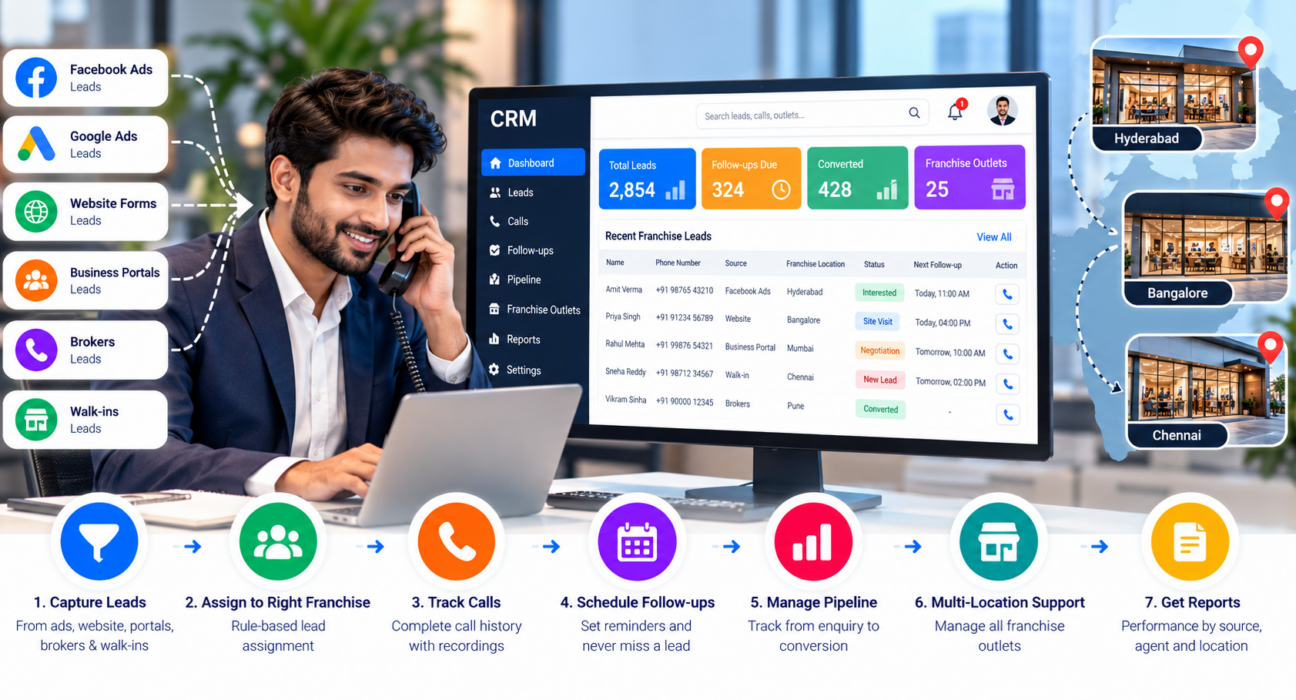
A franchise business rarely gets leads from one place. Enquiries come from Facebook ads, property or business portals, website forms, brokers and walk-ins at outlets. If each franchise keeps its own spreadsheet, follow-ups get missed and head office cannot see what is really happening.
A good CRM fixes this by giving every lead one record, one owner and one next follow-up date. If your franchise sales run mostly on phone calls, look for a lead management CRM with calling and follow-up tracking rather than a heavy marketing suite.
This guide explains what franchise CRM software should do, which features matter most, how to choose, and where a telecalling-focused CRM fits.
What Is the Best CRM for Franchise Sales?
The best CRM for franchise sales captures leads from every source, assigns each lead to the right person or location, tracks every call and follow-up, and gives head office clear reports. There is no single best tool for every business. The right choice depends on whether you sell franchises or sell through franchises, and how much of your selling happens on calls.
What Is Franchise CRM Software?
Franchise CRM software is a system that helps a franchise brand manage leads, customer conversations and sales activity across many locations or teams. It keeps data in one place while letting each franchise or sales executive work on their own leads.
“Franchise sales” can mean two different things, and the right CRM depends on which one you mean:
- Selling franchises (franchise development): A franchisor finds and converts people who want to open a franchise. These are long sales cycles with several calls, document sharing and decision-makers.
- Selling through franchises: A brand with franchise outlets handles customer leads for admissions, property, insurance or services, then routes them to the right outlet.
Many brands do both. Decide which is your main need before you compare tools.
Why Franchise Sales Teams Need a CRM
Franchise networks have problems that a single-office team does not.
- Leads are scattered. Ads, portals and forms each send leads to different inboxes or sheets.
- Ownership is unclear. Two outlets may call the same lead, or nobody calls it.
- Follow-ups depend on memory. Franchise leads often need three to six touchpoints before a decision.
- Head office has no visibility. Without call logs and stage data, it is hard to know which source or location performs well.
- Staff turnover breaks continuity. When a caller leaves, their notes leave with them.
A shared CRM reduces these gaps. It does not replace a good sales process, but it makes a good process easier to follow.
Key Features to Look For in Franchise CRM Software
1. Automatic Lead Capture from Multiple Sources
Your CRM should pull leads from the channels you already use, such as social ads, search ads, listing portals, website forms and spreadsheets. Manual copy-paste creates delays, and a slow first call usually means a colder lead.
2. Rule-Based Lead Assignment
Leads should reach the right person without someone forwarding messages. Look for assignment by city, product, source or round-robin. This is especially important when several franchise locations share one lead pool.
3. Call Tracking and Call History
For phone-led sales, the CRM should log each call with its duration, outcome and notes. Call recordings help with quality checks and training. A new team member should be able to open a lead and understand the full history in a minute.
4. Follow-Up Scheduling and Reminders
This is the core of any lead follow-up software. Check that callers can set a callback date and time, receive reminders, and see overdue follow-ups clearly. Managers should be able to spot leads that have not been touched.
5. A Visible Sales Pipeline
Stages such as New, Contacted, Interested, Site Visit or Meeting, Negotiation and Won help you see where leads get stuck. For franchise development, you may add stages like Documents Shared or Agreement Pending.
6. Roles and Permissions
Franchise owners usually should not see another franchise’s leads. Role-based access lets head office see everything while each team sees only its own data.
7. Reports That Managers Will Actually Use
Useful reports include calls made, connection rate, follow-ups pending, conversions by source and performance by agent. Fewer, clearer reports beat a dashboard nobody opens.
8. Messaging Support
WhatsApp, SMS and email help when a lead does not pick up. Templates keep communication consistent across locations.
9. Ease of Use
Callers will not use a complicated tool. Ask your team to test the mobile app and the daily calling workflow before you decide.
Franchise CRM Evaluation Checklist
| Question to ask | Why it matters |
|---|---|
| Can it capture leads from all our current sources? | Avoids manual entry and delays |
| Can leads be assigned by location, product or rule? | Prevents duplicate or ignored leads |
| Does it log calls, outcomes and recordings? | Gives continuity and quality control |
| Are follow-up reminders and overdue alerts available? | Reduces lost leads |
| Can we limit data access by role or location? | Protects franchise data boundaries |
| Does it show pipeline stages and conversion by source? | Helps decide where to spend on marketing |
| Does it work well on mobile? | Field and outlet teams can use it daily |
| Is pricing clear for our team size? | Avoids surprise costs as you add users |
| Does it support DNC and consent requirements? | Reduces compliance risk in outbound calling |
How to Choose Franchise CRM Software: 6 Steps
- Define your sales model. Are you selling franchises, selling through franchises, or both?
- Map your lead sources. List every channel and who currently handles it.
- Write your sales stages. Keep them simple, usually five to seven.
- Shortlist two or three tools. Compare them against the checklist above.
- Run a small trial. Use real leads with a few callers and one manager.
- Check adoption after two weeks. If callers avoid the tool, the problem is usually usability or training.
Practical Examples (Hypothetical)
These are illustrative scenarios, not customer case studies.
Example 1: A coaching institute franchise. An education brand runs Facebook ads for its centres in several cities. Leads are assigned by city, and each centre’s counsellors get a daily follow-up list. Head office checks which city has the most leads that were never called.
Example 2: A franchisor selling new franchises. A food brand receives enquiries from its website and portals. A small central team calls each enquiry, logs budget and city preference, and moves serious candidates through stages until a meeting is booked. Notes from each call stay in the record, so the next caller does not repeat questions.
Example 3: A real estate brokerage network. Portal leads arrive in bulk. Rules assign them by locality, and unanswered leads are retried at a later time. Managers review connection rates by source before renewing portal plans.
Common Mistakes When Choosing a Franchise CRM
- Buying for features you will not use. A simple tool used daily beats a complex one used rarely.
- Ignoring the calling workflow. If sales are phone-led, the CRM should make calling easy.
- No clear lead ownership rules. Software cannot fix a process nobody has agreed on.
- Skipping data access planning. Decide early who can see and export what.
- Not training franchisees. Even good software fails without a short onboarding session.
- Judging only on price. Consider setup effort, support and how cost changes as your team grows.
Where TeleCallingCRM Fits
TeleCallingCRM is a telecalling and lead management CRM for sales teams. It is not marketed as a franchise-specific platform, so you should check whether it matches your franchise structure before deciding. Based on its website, it includes:
- A smart auto dialer and call tracking with duration, outcomes, recordings and notes
- Lead import, de-duplication, DNC checks and automatic lead assignment rules
- Follow-up scheduling with reminders and overdue alerts
- Lead integrations with sources such as Facebook and Instagram Lead Ads, Google Ads, 99acres, Housing.com, MagicBricks, JustDial, WordPress and Google Sheets
- A customisable sales pipeline with deal values and stage history
- Roles and permissions, custom fields, reports and a live team monitoring view
- WhatsApp, SMS and email options, plus a mobile app
This makes it a reasonable fit for a central or regional team that sells over the phone, such as a franchise development desk or a brand’s lead-handling team. You can also look at its pages for real estate and education teams, which are common franchise sectors.
If you need franchise-specific structures, such as multi-level franchise hierarchies, franchisee onboarding or legal document tracking, ask the vendor for a demo and test these directly. You can compare plans on the pricing page or see how it stacks up on the comparison page.
Franchise CRM FAQs
What is franchise CRM software?
Franchise CRM software helps a franchise brand manage leads, follow-ups and sales activity across multiple locations or teams. It centralises data, assigns leads to the right person, and shows head office performance by location, source and agent.
Which CRM is best for franchise lead management?
The best option is the one that fits your sales model. For phone-led sales, choose a CRM with call tracking, follow-up reminders, lead assignment rules and role-based access. For franchise onboarding or legal workflows, look at franchise-specific platforms as well.
Do I need a separate CRM for franchise development and customer leads?
Not always. Small networks can use one CRM with separate pipelines for franchise candidates and customer leads. Larger brands sometimes use separate systems if the workflows, teams and data permissions are very different.
Can a telecalling CRM work for franchise sales?
Yes, if your franchise sales depend heavily on calls. A telecalling CRM helps teams call faster, log outcomes and follow up on time. It may need extra checking if you need franchise-specific features like multi-level hierarchies.
How do I stop franchisees from seeing each other’s leads?
Use role-based permissions. Give head office full access and limit each franchise or team to its assigned leads. Confirm during the trial that restrictions work as you expect for viewing and exporting data.
What features matter most for franchise lead follow-up?
Follow-up scheduling, reminders, overdue alerts, call history, clear pipeline stages and automatic lead assignment matter most. These reduce missed callbacks and help new team members continue a conversation without starting over.
How much does franchise CRM software cost?
Costs vary widely. Some tools charge per user each month, while others use flat plans for a set number of users. Compare the total yearly cost for your team size, and check what is included in each plan. TeleCallingCRM publishes its plans on its pricing page.
How long does it take to set up a CRM for a franchise network?
A basic setup with lead import, stages and users can take hours or days. A multi-location rollout takes longer because of data cleanup, assignment rules and training. Starting with one region or team is usually safer.
Conclusion
Franchise sales go wrong when leads are scattered, owners are unclear and follow-ups depend on memory. The right franchise CRM software brings capture, assignment, call history, reminders and reporting into one place. Start by deciding whether you are selling franchises, selling through franchises, or both, then test tools against the checklist above using real leads.
If your team is call-driven, you can see how lead follow-up software works in practice by requesting a demo and asking about your franchise structure directly.