
How to Assign the Right Field Employee to Every Customer Visit
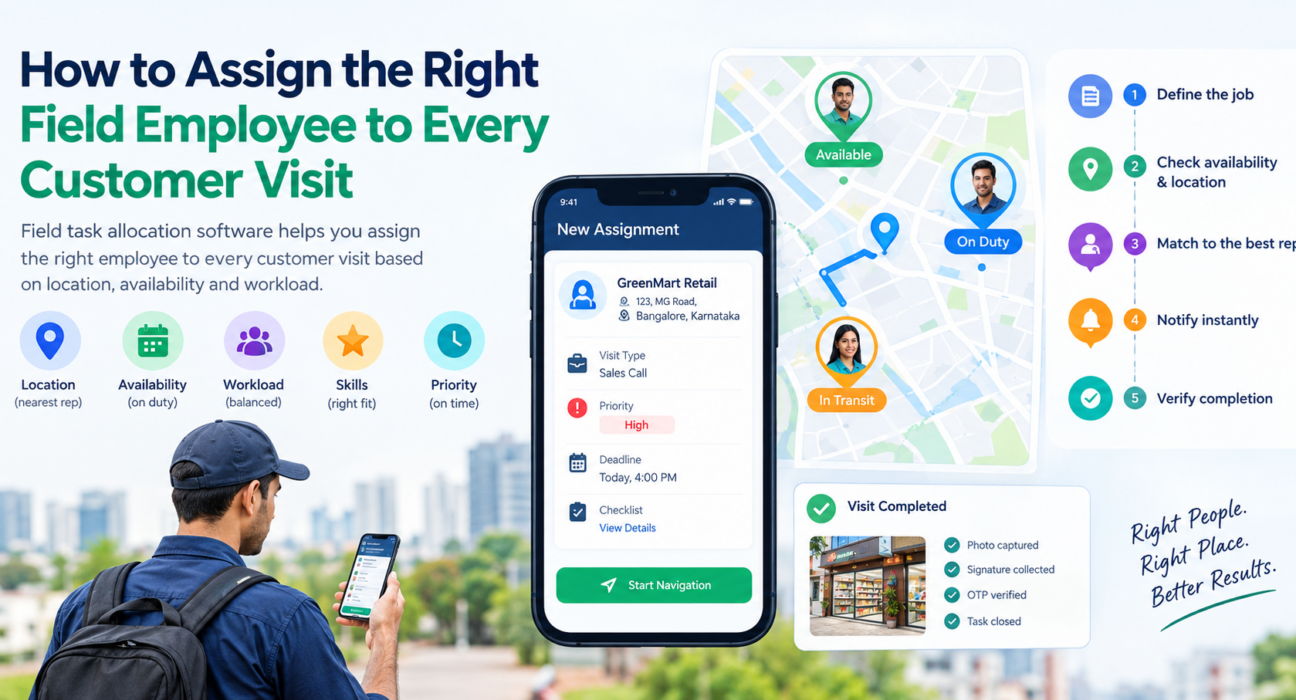
Field task allocation software helps you assign the right employee to every customer visit based on location, availability and workload. Most teams still assign visits to whoever picks up the phone first.
That works with five reps. At twenty-five, it leads to missed appointments, crisscrossing routes and unbalanced workloads. This guide covers what task allocation means, what makes an assignment “right,” and how to build a process that scales.
What Is Field Task Allocation?
Field task allocation is the process of assigning customer visits, service jobs, collections or sales calls to specific field team members, based on location, availability, skills and priority.
Software moves that decision from a manager’s memory into a system. The manager creates a task. The system shows who is nearby and how busy they are, and the assigned rep gets the task on their phone.
It differs from a simple to-do list in three ways:
- It knows where your people are.
- It tracks what they are already carrying.
- It records proof that the work was done.
Why Assigning the Wrong Employee Costs You Money
A bad assignment rarely looks like a problem on the day. It shows up later as slow response, missed SLAs and unhappy customers.
Here are the usual patterns:
- Wasted travel: A rep drives across the city while a colleague finishes a job two streets from the customer.
- Uneven workload: Your most reliable rep gets everything, and newer reps sit idle.
- Missed priorities: An urgent complaint waits behind a routine visit.
- Skill mismatch: A complex installation goes to someone who has never done one.
- No accountability: Nobody can say who was told to go, who actually went, or when.
These are management problems before they are technology problems. Software helps only when your rules are clear.
What Makes an Assignment “Right”?
Before you automate anything, decide which factors matter most for your business. Most field teams weigh these five.
| Factor | The question to ask | Why it matters |
|---|---|---|
| Proximity | Who is closest to the customer right now? | Less travel time, faster arrival |
| Availability | Is the rep on duty and not mid-job? | Prevents double-booking |
| Workload | How many visits does the rep already have today? | Keeps the load fair and realistic |
| Skill or role | Can this person handle this type of job? | Higher first-visit completion |
| Priority and SLA | How urgent is this, and what is the deadline? | Protects customer commitments |
You don’t need to weigh all five equally. A courier business may care most about proximity. A repair business may care most about skill and SLA.
How to Assign the Right Field Employee: A Step-by-Step Process
To assign the right field employee to a customer visit, define the job, check live availability and location, match it to the best-fit rep, notify them instantly, and verify completion. Here is each step in detail.
1. Define the job clearly
Vague tasks create vague results. Every visit should carry the customer name and address, the visit type, a priority level, a deadline or SLA, and a checklist of what the rep must do.
2. Know where your team actually is
You cannot pick the nearest rep if you don’t know who is nearest. Live location visibility, limited to staff who are on duty and have granted permission, turns “I think Priya is nearby” into something you can see.
3. Check availability and workload
Look at who has punched in, who is in transit and who is already at a customer site. A rep with four stops left shouldn’t be your default for a fifth.
4. Match the visit to the best-fit rep
Apply your priorities. For an urgent job, the closest available rep usually wins. For a planned visit, the rep who owns that territory or account may be the better choice, because the relationship matters.
5. Notify the rep instantly
The assignment should reach the rep’s phone with all the details. Don’t make them hunt for information across calls and chat threads.
6. Verify completion
Closing a task should require evidence. Photos, signatures, OTP confirmation and a completed checklist show the visit happened and what was done.
7. Review and refine
Look at the data weekly. Which reps are overloaded? Which territories take too long? Where are SLAs slipping? Adjust your rules based on what you find.
Manual Allocation vs. Field Task Allocation Software
| Manual (calls, WhatsApp, spreadsheets) | Field task allocation software | |
|---|---|---|
| Visibility of rep location | Ask by phone | Live map |
| Workload balancing | Based on memory | Based on current task data |
| Reps get task details | Scattered messages | One task card on the phone |
| Proof of visit | Rep’s word | Photo, signature, OTP, geofence |
| SLA tracking | Manual follow-ups | Timers and alerts |
| Reporting | Compiled after the fact | Real-time |
Manual allocation isn’t wrong for a very small team. It stops working when decisions are time-sensitive and you can’t see your people.
Features to Look For in Field Task Allocation Software
Not every tool covers the full workflow. When comparing options, check for:
- Live location and status: Who is on duty, in transit or at a customer site.
- Task creation with priority and SLA: So urgent work is visibly different from routine work.
- Assignment suggestions: Help picking a rep based on location and workload.
- Mobile app for reps: Task details, navigation and updates in one place.
- Offline capability: Field networks are unreliable, so the app should keep working and sync later.
- Proof of visit: Photo, signature and OTP capture before a job can close.
- Geofencing: Confirms the rep was actually at the customer location.
- Custom forms and workflows: So the task fits how your business works.
- Route planning: Sequences stops sensibly once visits are assigned.
- Reporting: Visit completion, SLA performance and team workload.
Also ask whether the tool covers adjacent needs such as attendance, expenses and collections. Running these in separate systems brings back the spreadsheet problem.
Best Practices for Fair and Effective Task Allocation
Software supports good habits but doesn’t replace them. These practices make the biggest difference:
- Set allocation rules in writing. Decide what takes priority when proximity and territory ownership conflict.
- Protect customer relationships. Where continuity matters, such as key accounts, assign the same rep consistently.
- Keep a buffer. Don’t schedule every minute of a rep’s day. Urgent jobs need room.
- Use checklists. A standard checklist reduces variation between reps.
- Require proof, but keep it light. Capture only what you will actually use.
- Be transparent with the team. Explain why tracking and proof exist. Reps cooperate more when the process feels fair.
- Review the data together. Use workload reports to coach and rebalance, not only to criticize.
Common Mistakes in Field Task Allocation
- Assigning purely by proximity. The nearest rep may be overloaded or unqualified.
- Ignoring rep feedback. Reps often know why a route or visit doesn’t work.
- Treating all tasks as equal. Without priority levels, urgent work gets buried.
- Skipping verification. Without proof, you can’t resolve disputes with customers.
- Over-customizing on day one. Start with a simple workflow and add complexity once it is stable.
A Practical Example of Assigning Field Visits
Consider a distribution company with a team of reps covering one city. A retailer calls to report a stock issue and wants someone that afternoon.
Without a system, the manager calls three reps to find who is free. The nearest one is mid-meeting and doesn’t answer. By the time someone is dispatched, half the afternoon has gone.
With a system, the manager creates the task and marks it urgent. The live map shows which reps are on duty, nearby and not overloaded. The task goes to the chosen rep’s phone with the address, checklist and deadline. When the visit closes, the manager has a photo and a timestamp. This is an illustration of the workflow, not a customer case study.
How FieldExecutives Supports Field Task Allocation
Businesses looking to simplify these processes can use field force management software such as FieldExecutives. It covers the assign, execute and monitor cycle in one platform.
Here is how that maps to the process above:
- Assign and dispatch: Managers create tasks and visits with checklists, priority and an SLA. The right rep receives them on their phone instantly, and the platform offers smart suggestions based on location and workload.
- Live visibility: The web console shows the team’s live status on one map, with punch-ins, movement and outcomes.
- Execute with proof: Reps follow a guided job card and capture photo, signature or OTP, with the app working offline and syncing when they reconnect.
- Attendance and geofencing: Punch-ins use server time with geofence enforcement and mock-location detection.
- Route planning: AI-based route and beat-plan optimization sequences stops after assignment.
- Custom forms and workflows: Teams can set their own job types, checklists, approvals and SLAs without writing code.
The platform serves many field operations, from field service and repair to FMCG and distribution. You can review the pricing plans to see what fits your team size. Results depend on your team, your territories and how consistently you apply your rules.
Conclusion
Assigning the right employee to the right visit is a daily decision that affects response time, travel cost, workload and customer trust. Doing it by phone and memory stops working once your team grows. A defined process, built on proximity, availability, workload, skill and priority, gives you consistency.