
TeleCalling CRM for Real Estate: Manage Property Leads and Follow-Ups
Telecalling CRM for real estate helps property sales teams capture every enquiry, call it quickly and follow up until a site visit is booked. Leads arrive from portals, ads, walk-ins and referrals, and the same buyer may enquire on three platforms in one week. Without one system, calls get duplicated, callbacks are forgotten and nobody knows which source brings serious buyers.
This guide explains how property teams can manage leads and follow-ups with a calling CRM, from setup to daily routine. If you want to see one in action, a calling CRM built for Indian sales teams is a good place to start.
Disclosure: this blog is published by TeleCalling CRM. We mention our own product where relevant, but the guidance applies to any good tool.
What Is Telecalling CRM for Real Estate?
Telecalling CRM for real estate is software that helps property sales teams capture leads from portals and ads, assign them to agents, call them, log outcomes and schedule follow-ups and site visits in one system. It replaces scattered Excel sheets and WhatsApp notes with one record per buyer.
It suits brokers, developers’ sales teams, channel partners and rental or resale agencies that depend on phone calls to move a buyer from enquiry to visit.
Where Property Teams Lose Leads
Most losses happen in the same places:
- Duplicate enquiries: one buyer fills forms on several portals, and two agents call them.
- Slow first call: the enquiry waits for manual assignment.
- Forgotten callbacks: “call me after the weekend” lives only in an agent’s memory.
- Unconfirmed site visits: no reminder before the visit, so the buyer does not turn up.
- Data on personal phones: when an agent leaves, so does the lead history.
- Unknown source quality: marketing cannot tell which portal gives real visits.
A calling CRM reduces each of these, provided the team follows clear rules.
How Telecalling CRM for Real Estate Works: From Enquiry to Site Visit
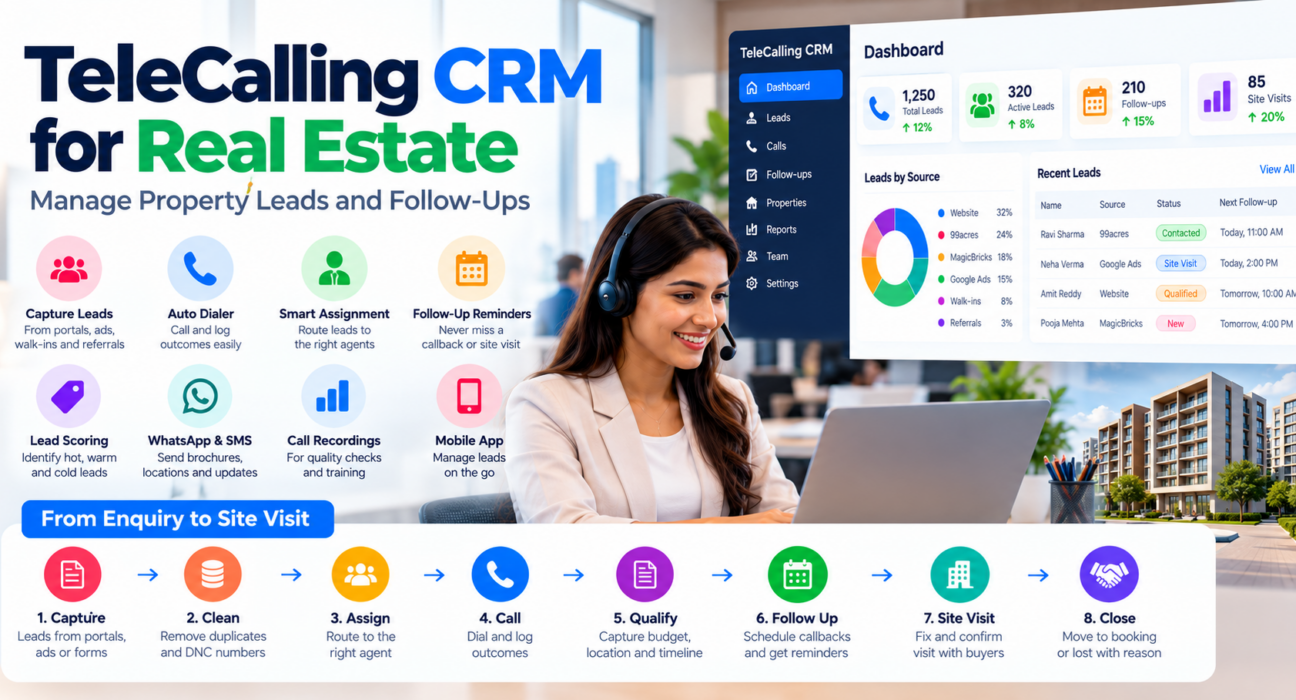
| Stage | What happens | What the CRM does |
|---|---|---|
| Capture | Enquiry arrives from a portal, ad or form | Records the lead with its source |
| Clean | Duplicates and DNC numbers are flagged | De-duplication and DNC checks |
| Assign | The lead goes to an agent | Round-robin, language or fixed-owner rules |
| Call | The agent dials and talks | Auto dialer, call duration and outcome logging |
| Qualify | Budget, location, configuration and timeline are noted | Custom fields, tags and lead scoring |
| Follow up | Callbacks are scheduled | Reminders and overdue alerts |
| Site visit | Visit is fixed and confirmed | Follow-up or stage update, plus reminder |
| Close and review | Deal moves to booking or lost | Pipeline stages and reports |
Features of Telecalling CRM for Real Estate
- Multi-source capture: CSV or Excel import, forms and direct integrations reduce manual uploads. See the integration setup guides.
- Duplicate handling: the same buyer from two portals should become one lead.
- Assignment rules: route leads by language, project or location, and to agents who are available.
- Lead scoring: hot, warm and cold labels help agents call serious buyers first.
- Custom fields and tags: record budget, locality, configuration (such as 2 BHK or 3 BHK), possession timeline and project interest.
- Auto dialer and call logging: agents move through a queue and log each outcome in a tap.
- Follow-up reminders: one-tap callbacks with overdue alerts.
- Messaging: send brochures, location pins and visit confirmations by WhatsApp, SMS or email, and keep them on the lead timeline.
- Call recording: useful for quality checks and for resolving “what was promised” disputes.
- Mobile app: field agents can log outcomes and check follow-ups on the move.
A Practical Pipeline for Property Leads
Keep stages few and meaningful. One simple structure:
- New: enquiry received, not yet called
- Contacted: spoke to the buyer
- Qualified: budget, location and timeline confirmed
- Site visit scheduled: date and time fixed
- Site visit done: visit completed, feedback noted
- Negotiation: price or payment plan discussed
- Booked: token or booking received
- Lost: with a reason such as budget, location or bought elsewhere
Adapt the names to your business. The important point is that every stage has a clear entry rule, so reports mean the same thing to everyone.
Follow-Up Rhythm That Works for Property Leads
This is a hypothetical example cadence. Adjust it to your market and project.
- Within minutes of the enquiry: call, and send a WhatsApp message with the brochure and location.
- No answer: retry later the same day, then the next day at a different time.
- Interested but undecided: follow up every two to three days with a specific reason, such as a new floor plan or an offer deadline.
- Visit scheduled: send a reminder the day before and a confirmation on the morning of the visit.
- After the visit: call within 24 hours to collect feedback.
- Unreachable after several attempts: mark the lead accordingly and pause, instead of calling endlessly.
Respect Do Not Call preferences and calling hours. India’s TRAI rules are set out in the Telecom Commercial Communications Customer Preference Regulations, 2018. A CRM can support compliance with DNC and calling-hour controls, but compliance remains your responsibility.
How to Set Up Telecalling CRM for Real Estate
- Clean your lead data. Remove duplicates and invalid numbers before importing.
- Connect your sources. Link the portals, ad accounts and forms you actually use.
- Define pipeline stages and call outcomes. Use the structure above and a short outcome list: interested, call back, not interested, wrong number, not reachable.
- Create custom fields. Add budget, locality, configuration and timeline.
- Set assignment rules. Decide who gets leads by project, language or round-robin.
- Train agents and review weekly. Check overdue follow-ups, site visits and lost reasons, then adjust.
Metrics to Track
| Metric | What it shows |
|---|---|
| First response time | How fast new enquiries are called |
| Connection rate | How many calls reach a person |
| Follow-up completion | Whether promised callbacks happen |
| Site-visit rate | Visits as a share of qualified leads |
| Source-wise visit rate | Which portal or campaign brings real buyers |
| Lost reasons | Why buyers drop out |
| Booking rate | Bookings as a share of site visits |
Compare these with your own baseline, not generic benchmarks. For dashboards and live monitoring, read our post on the live war room and reports.
Common Mistakes to Avoid
- Too many stages: agents stop updating them and reports lose meaning.
- Importing dirty data: duplicates and wrong numbers waste agent time.
- No site-visit reminders: missed visits are an avoidable loss.
- Judging portals by lead count: compare visits and bookings instead.
- Calling too often: repeated calls hurt trust and may breach preference rules.
- No training: a CRM only works if every call is logged.
How TeleCalling CRM Fits Property Teams
Based on its website, TeleCalling CRM is built for outbound sales teams in India. It lists:
- A smart auto dialer with call duration capture and one-tap outcome logging
- Lead import, de-duplication, DNC checks and rule-based assignment
- Hot, warm and cold scoring, tags, custom fields and capture forms
- Follow-up scheduling with reminders and overdue alerts
- 12+ lead-source integrations, including Facebook and Instagram Lead Ads, Google Ads, 99acres, MagicBricks and JustDial
- SMS, email and WhatsApp messaging, call recording and AI call analysis
- A sales pipeline with custom stages and deal values, plus source performance and agent comparison reports
- A live war room and an Android and iOS app
Per its pricing page, Basic is ₹999 per month for up to 5 users and Pro is ₹1,599 per month for up to 10 users, excluding GST. The website also mentions a 3-day free trial. Review the features page against your needs.
Property inventory management and unit-matching are not listed on the features page, so confirm with the team if you need them. For a broader buying process, see our selection checklist. You can also read our industry page for property teams and our earlier guide on turning property enquiries into deals.
FAQs: Telecalling CRM for Real Estate
What does a telecalling CRM do for property sales?
It captures enquiries, assigns them to agents, supports calling, logs outcomes and schedules follow-ups and site visits. Managers can then see which sources and agents produce visits.
Can small brokers use telecalling CRM for real estate?
Yes. Even a team of three to five agents can lose leads to duplicate calls and forgotten callbacks. Choose a tool with simple setup, a mobile app and clear pricing.
Can it capture leads from 99acres, MagicBricks and Facebook?
Many tools support this through direct integrations. TeleCalling CRM lists 99acres, MagicBricks, Facebook and Instagram Lead Ads among its integrations. Verify that your exact sources are supported before buying.
How do I track site visits in a calling CRM?
Add pipeline stages such as “Site visit scheduled” and “Site visit done”, and set reminders before each visit. Record feedback after the visit in the lead’s notes.
How many follow-up calls should a property lead get?
There is no fixed number. Follow a clear cadence, vary the time of day, stop after repeated non-response and respect DNC preferences. Review your own data to refine it.
Does telecalling CRM for real estate include property inventory?
Not always. Many calling CRMs focus on leads, calls and follow-ups. If you need inventory or unit-matching, check this with each vendor.
Does a CRM guarantee more bookings?
No. It supports faster response and better follow-ups, but bookings also depend on pricing, project quality, lead quality and agent skills.
Conclusion
Property sales depend on timing and trust. A calling CRM helps by giving every enquiry an owner, every call a record and every follow-up a reminder, so buyers are not lost between portals, sheets and phones.
If you want to test this with your own leads, you can review the monthly plans and free trial and set up a short pilot with two or three agents.