
Best CRM for Telesales Teams: Features to Look For
If your team spends most of the day on the phone — calling leads, following up, closing deals — a regular CRM built for email and forms will slow you down. A telesales team needs software built around the call itself, not around it.
This is where the right CRM for telesales makes a real difference. It should help agents dial faster, never lose a lead in a spreadsheet, and give managers a clear view of who is calling, who is closing, and where the pipeline stands.
This guide breaks down the exact features you should check before choosing a telecaller CRM, so you don’t end up paying for something that doesn’t fit how your team actually sells.
What Is a CRM for Telesales, and How Is It Different?
A CRM for telesales is software built specifically for outbound calling teams. Unlike a general-purpose CRM, it puts the call — not the email or the deal card — at the centre of the workflow.
In short: a telesales CRM should let an agent dial, log the outcome, and move to the next lead without switching between five different tools.
A generic CRM can store contacts and deals, but it usually has no dialer, no call tracking, and no way to manage a list of leads that needs to be called through in priority order all day, every day. That gap is exactly what telecalling software and telecaller CRM tools are built to fill.
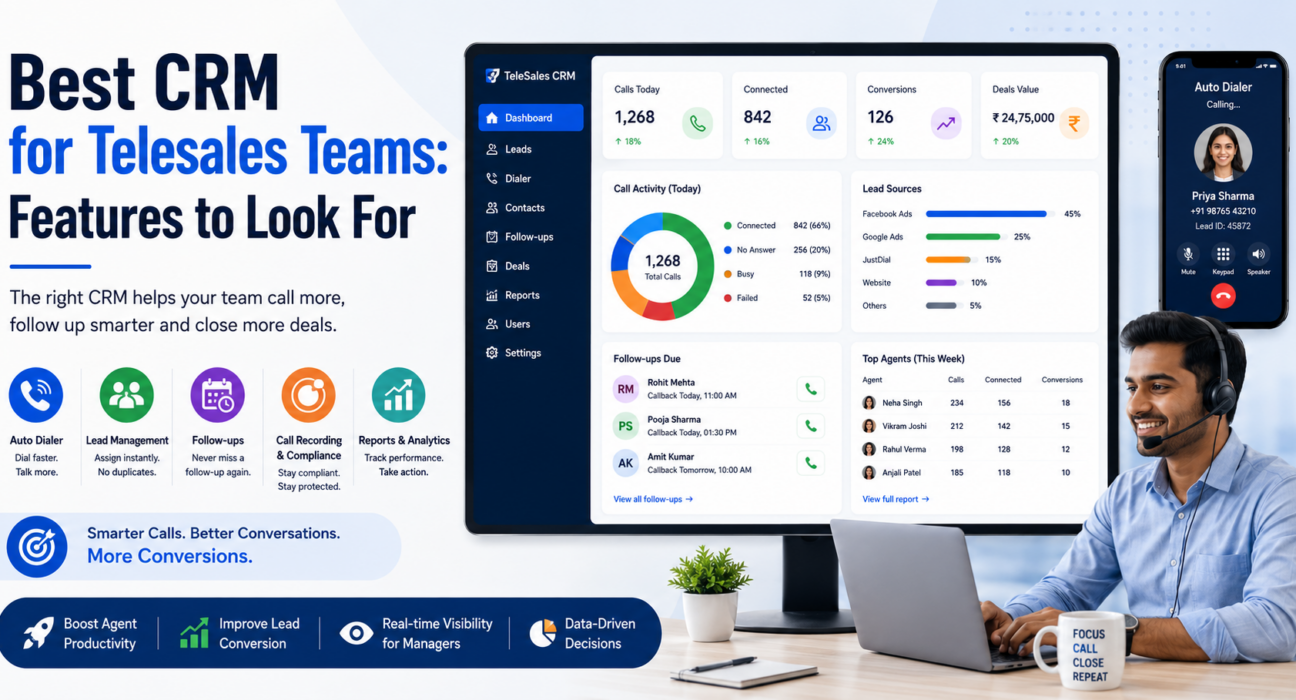
9 Features to Look For in a CRM for Telesales
Not every CRM labelled “for sales” is built for telecalling. Here are the features that actually matter for a team making outbound calls every day.
1. A Smart Auto Dialer
This is the core of any sales calling software. An auto dialer should move through a list of assigned leads automatically, so agents spend their time talking instead of manually punching in numbers.
Look for:
- Auto-dialing through a prioritised lead list
- Pause and resume control for agents
- Automatic call-duration capture
- One-tap outcome logging after each call
Without this, agents lose several minutes between every call just dialling, waiting, and manually noting down what happened.
2. Lead Management and Auto-Distribution
Good lead management software does two things well: it stores every lead with full history, and it gets that lead to the right agent without a manager manually assigning it.
Check whether the CRM offers:
- Bulk import from Excel or CSV with automatic de-duplication
- Assignment rules — round robin, language match, or fixed agent
- Lead scoring so agents call hot leads first
- Full call history and notes on every lead record
For teams buying leads from Facebook Ads, property portals, or Google Ads, this is often the single biggest time-saver, since leads land directly in the pipeline instead of a shared spreadsheet.
3. Follow-Up and Reminder Management
Telesales rarely closes on the first call. Most conversions come from the third, fourth, or fifth follow-up — which is exactly why lead follow-up software matters as much as the dialer itself.
A telecaller CRM should let agents:
- Schedule a callback in one tap
- Get reminders before a follow-up is due
- See overdue follow-ups flagged automatically
- Auto-create the next follow-up based on how the last call went
If follow-ups live in a notebook or a personal reminder app, leads will slip through — and in telesales, a missed follow-up is usually a lost sale.
4. Call Recording and Compliance (DNC, TRAI)
For any business making outbound calls in India, compliance isn’t optional. A telesales CRM should support Do Not Call (DNC) list checks and respect calling-hour restrictions automatically, not leave it to individual agents to remember.
Also check for:
- Encrypted call recording and secure playback
- Configurable data retention and auto-purge of old records
- Role-based access, so only the right people can hear recordings
This protects the business from compliance complaints and gives managers a way to review actual conversations for quality and training.
5. Sales Pipeline and Revenue Tracking
A telesales team is still a sales team — which means leads need to move through stages with a rupee value attached, not just sit in a “contacted” or “not contacted” bucket.
Useful pipeline features include:
- Custom stages that match your actual sales process
- Deal value and expected close date on every lead
- Weighted forecasting based on stage probability
- Win-rate and average deal size by agent
This turns the CRM from a calling tool into something a sales manager can use to actually forecast revenue.
6. Real-Time Analytics and Reporting
Managers running a telesales floor need to know, in real time, how many calls are happening, how many are connecting, and who needs help — not wait for an end-of-day spreadsheet.
Look for a dashboard that shows:
- Live call volume, talk time, and connection rate
- Team leaderboards by calls, talk time, or conversions
- Custom, exportable reports for calls and follow-ups
Connection rate and answer rate, in particular, are useful metrics that many basic CRMs don’t track accurately.
7. A Mobile App for Agents
Many telesales teams today are not fully desk-bound — some agents work remotely, and field sales reps need to call leads between site visits. A mobile app that supports the full calling workflow, not just contact viewing, is important.
At minimum, the app should allow agents to:
- Dial and log outcomes from their phone
- View and manage follow-ups on the move
- Punch in and out for attendance tracking
8. Built-In Messaging (WhatsApp, SMS, Email)
Calls alone don’t close every deal. Many leads expect a WhatsApp follow-up, a pricing SMS, or an email with details after a call. A telecalling software that includes messaging on the same lead timeline saves agents from switching between apps to keep the conversation going.
9. AI-Powered Call Analysis (Where Available)
Some modern telecaller CRM platforms now include AI that automatically transcribes calls, summarises what was discussed, and flags sentiment or coaching points. This isn’t essential, but it can save significant manual QA time for larger teams, since managers don’t need to listen to every call to know how it went.
Feature Checklist at a Glance
| Feature | Why It Matters for Telesales |
|---|---|
| Auto dialer | Reduces manual dialling time between calls |
| Lead management & distribution | Leads reach the right agent instantly |
| Follow-up reminders | Prevents leads from being forgotten |
| Call recording & DNC compliance | Keeps calling activity within legal limits |
| Sales pipeline & revenue tracking | Turns calls into a forecastable pipeline |
| Real-time analytics | Gives managers floor-level visibility |
| Mobile app | Supports remote and field agents |
| Messaging (WhatsApp/SMS/Email) | Keeps the conversation going after the call |
| AI call analysis | Speeds up QA and coaching for larger teams |
Real-World Examples of Telesales in Action
These are illustrative examples of how different industries use telesales CRM features — not case studies of any specific customer.
- Real estate: An agent gets a lead from a property portal, the CRM auto-assigns it based on the project or location, and a follow-up reminder is set automatically after the first call to check back before the site visit.
- Insurance: A renewal list is imported before policy expiry dates. Agents work through it with the auto dialer, and the CRM logs which customers renewed, which need a follow-up call, and which need an SMS reminder.
- Education: During admission season, leads from Google Ads and a website form land directly in the CRM, get scored by intent, and are distributed to counsellors so no enquiry sits unanswered for hours.
Common Mistakes Telesales Teams Make When Choosing a CRM
- Picking a generic CRM without a built-in dialer. Teams end up bolting on a separate dialer tool, which breaks the call-logging workflow and doubles the software cost.
- Ignoring DNC and compliance features. This can lead to complaints and, in some cases, penalties — it’s worth checking this before signing up, not after.
- Not checking mobile app capability. If your agents work remotely or in the field, a CRM without a proper mobile dialer will limit them.
- Choosing based on price alone. A cheaper plan that locks features like analytics or automation behind a higher tier often costs more once you factor in the add-ons.
- Skipping the trial. Most telecaller CRM providers offer a free trial. Import a real lead list and have agents actually dial through it before committing — this reveals workflow gaps a demo won’t show.
How TeleCallingCRM Supports Telesales Teams
TeleCallingCRM is built specifically for outbound telecalling teams in India, with the auto dialer, lead management, follow-up scheduling, and real-time analytics covered in this guide included in every plan. It also includes call recording with DNC enforcement, a sales pipeline with revenue forecasting, and a mobile app for Android and iOS.
Teams comparing options across industries — such as real estate, insurance, education, or recruitment — can review industry-specific use cases to see how the same core features apply to their calling process. This article isn’t meant as a sales pitch — the same feature checklist above applies whichever telecaller CRM you evaluate.
Frequently Asked Questions
What is the best CRM for a telesales team?
There’s no single “best” CRM for every team — the right choice depends on your call volume, lead sources, and compliance needs. Look for one with a built-in auto dialer, lead distribution, follow-up reminders, and DNC compliance as the non-negotiable basics.
Is a telecalling CRM different from a regular sales CRM?
Yes. A regular CRM tracks contacts and deals but usually lacks a dialer, call logging, and lead-distribution rules built around outbound calling. A telecalling CRM is built with the call as the primary activity.
Do small telesales teams need a CRM, or is a spreadsheet enough?
A spreadsheet can work for a handful of leads, but it breaks down quickly once you have multiple agents, repeat follow-ups, and leads coming from more than one source. Most teams see the need for a proper CRM once they cross 3–5 telecallers.
What compliance features should a telesales CRM have in India?
At minimum, it should support DNC (Do Not Call) list checks, enforce calling-hour restrictions, and offer encrypted call recording with controlled access. This keeps outbound calling activity within TRAI guidelines.
Does a telesales CRM need a mobile app?
It depends on your team structure. If agents work remotely, in the field, or need to call outside office hours, a mobile app with full dialer functionality is important. Desk-based call centre teams may rely more on the desktop dashboard.
How much does a good CRM for telesales cost?
Pricing varies by provider and plan. Some charge per user per month, while others offer flat pricing for a fixed number of seats. It’s worth comparing the total cost for your team size, not just the starting price, since some providers lock key features behind higher tiers.
Can a telesales CRM integrate with WhatsApp?
Many modern telecalling software options do support WhatsApp messaging alongside calls, so agents can send follow-up messages or pricing details without leaving the CRM. Confirm this is included in the base plan, not sold as a separate add-on.
Conclusion
Choosing a CRM for telesales comes down to matching features to how your team actually works — dialling, following up, and moving leads through a pipeline. The dialer, lead distribution, follow-up reminders, and compliance controls covered here are the features worth prioritising over anything else.
Once you have a shortlist, it’s worth comparing telecaller CRM pricing plans side by side, including what’s included at each tier, before making a final decision.